

















How to Reverse Ceiling Fan Direction for Every Season
Flipping the switch on a ceiling fan is one of those simple home maintenance tasks that makes a surprisingly big difference. For older fans, you'll find a small toggle switch on the motor housing itself—just flip it. On newer models, the remote control usually has a reverse button, often with a little circular arrow icon. That one click changes everything, turning your fan from a summer savior into a winter wonder.
Why Ceiling Fan Direction Matters More Than You Think
Ever walked into a room in the winter and it felt stuffy, even though the heat was blasting? Or felt like your fan was just pushing hot air around on a summer afternoon? The problem isn't your fan; it's the direction the blades are spinning. Get ready for a little home comfort wizardry.
This isn't just a gimmick. It’s a small adjustment that uses basic physics to make your home feel dramatically more comfortable all year long.
When the blades spin counter-clockwise, you get a direct downdraft. This column of air creates a wind-chill effect on your skin, making you feel cooler without actually changing the room’s temperature. It’s the perfect setting for those sweltering summer days when you need a little relief.
Flip the switch, and a clockwise spin does the complete opposite. Instead of pushing air straight down, it pulls the cooler air from the floor up towards the ceiling. This updraft displaces the warm air that naturally rises and gets trapped up there, gently circulating it back down the walls and into the room.
The Science of Seasonal Comfort
This simple trick is also a fantastic energy-saving strategy. Using your fan correctly works with your HVAC system, not against it, which can cut your heating and cooling costs by up to 15%. For a deeper dive into how features like this have become standard, you can check out these ceiling fan industry insights.
Think of it this way: In summer, the fan is your personal breeze machine. In winter, it’s a gentle air circulator, making sure all that cozy, paid-for heat doesn’t just hang out at the ceiling doing nothing.
If you’re thinking about an upgrade, investing in a quality fan with an easy-to-use remote makes this seasonal switch a breeze. High-end models like the architecturally stunning Maverick by Monte Carlo, which typically sells for around $700, offer not only a bold look but also effortless, remote-controlled reversal.
Your Year-Round Ceiling Fan Cheat Sheet
To take the guesswork out of it, here's a quick reference guide. Just set your fan accordingly and enjoy a more comfortable room, no matter the season.
| Season | Blade Direction | Airflow Effect | Recommended Speed |
|---|---|---|---|
| Summer | Counter-Clockwise | Creates a cooling downdraft (wind-chill effect) | Medium to High |
| Winter | Clockwise | Circulates warm air trapped at the ceiling | Low |
Keep this cheat sheet handy, and you'll always have your fan working for you, saving energy and keeping your home feeling just right.
Alright, you understand why you should reverse your fan’s direction with the seasons. Now for the fun part: actually doing it. Finding that little switch can feel like a scavenger hunt, since its location really depends on the fan's age and style. But don't worry—we'll walk through all the common spots so you know exactly where to look.
First things first: safety. Before you even think about touching the fan, turn it off at the switch and wait for the blades to stop spinning completely. If you need a ladder to reach it, it's always a good idea to kill the power at the circuit breaker too. Better safe than sorry.
This diagram is a great visual reminder of which way the blades should turn.
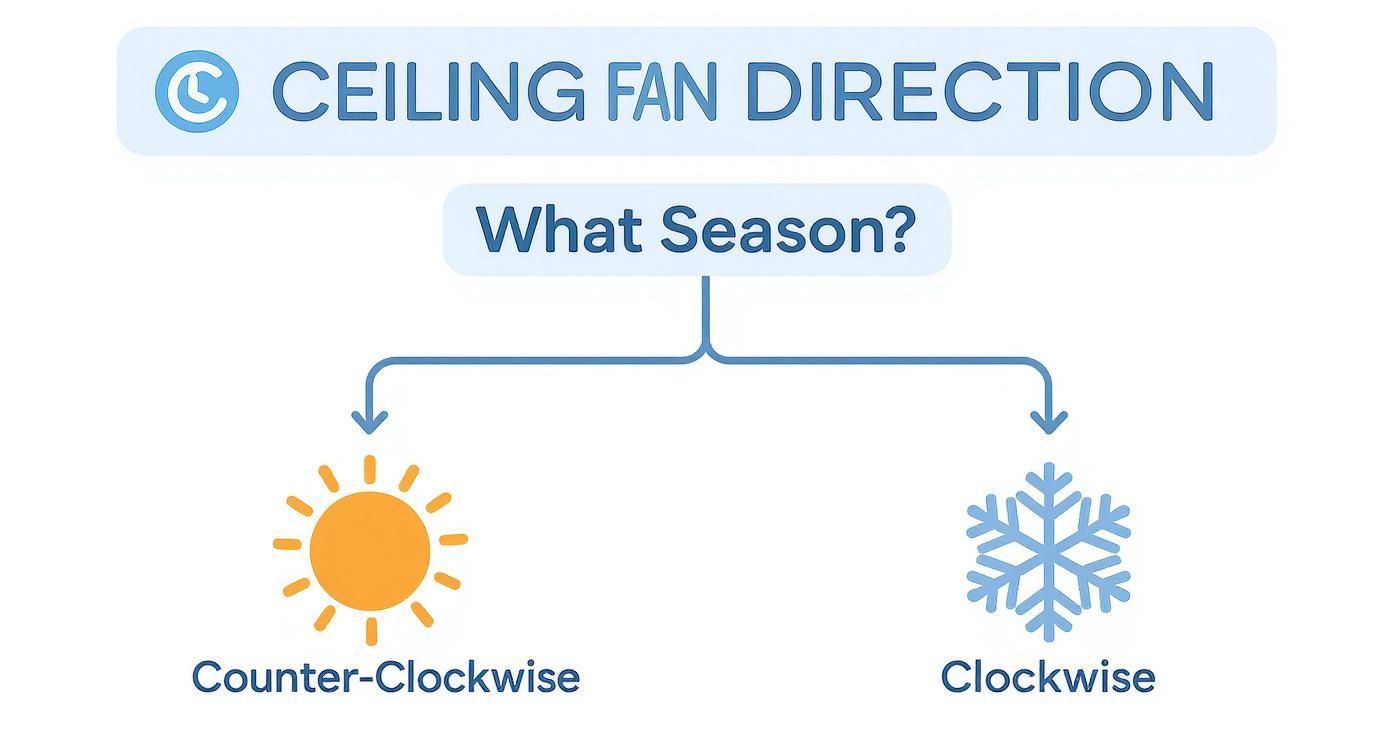
As you can see, counter-clockwise creates that cooling summer downdraft, while a clockwise spin gently recirculates warm air in the winter.
The Old-School Toggle Switch on the Housing
On most traditional ceiling fans, especially older ones, the reverse switch is a small toggle right on the motor housing. That's the main body of the fan where the blades attach.
- You'll have to look closely. It's often tiny and designed to blend in. Sometimes you'll see little icons (a sun and a snowflake) or just arrows to guide you.
- For high ceilings, grab a ladder. Make sure it’s steady and on level ground before you head up.
- Just flip it. Once you find the switch, push it to the other side. That’s really all it takes on these classic models.
Wall Controls and Remote Controls
If your fan is operated by a special wall panel instead of a standard switch, the reverse function is probably built right in. The same goes for fans with remote controls. This is where things get easy.
Look for a button with an icon of two circling arrows, or one that’s labeled "Reverse," "Direction," or even "Fan Dir." One press should do the trick. A quick tip: the fan usually needs to be on (even at low speed) for the reverse button to work. If you press it and nothing happens, make sure the fan has power from the control panel.
What If There’s No Switch in Sight?
Feeling stumped? Some modern designs, particularly the "hugger" style fans that sit flush against the ceiling, are sneaky. The switch might be hidden above the blades or tucked behind a decorative part of the housing. If you’ve given it a good look and come up empty, your best bet is to Google the fan's model number. You can almost always find the manual online, which will have a diagram showing you its exact location.
Pro Tip: After you flip the switch, turn the fan back on its lowest setting and stand directly underneath it. Feeling a cool draft? You're in summer mode (counter-clockwise). If you barely feel any air movement, it's set for winter (clockwise), pushing that warm air down from the ceiling.
Of course, if you want to skip the ladder and the guesswork for good, a fan with a remote is a worthy investment. High-end models like the sleek Chisel by Fanimation, which can run over $500, offer premium performance and let you reverse the fan's direction with a simple click. That kind of convenience makes seasonal adjustments completely effortless.
Using Remotes and Smart Apps to Change Fan Direction
Forget climbing ladders and fiddling with tiny switches. If you have a modern ceiling fan, chances are you can reverse its direction without ever leaving your couch. Today’s technology makes this seasonal adjustment incredibly simple, putting year-round comfort right at your fingertips. It's less of a chore and more of a "wow, that was easy" moment.

This shift to remote and app-based controls is more than just a convenience; it's a real evolution in home efficiency. The market for smart ceiling fans was already valued at USD 698.4 million back in 2018 and has only grown since, as more and more people look for integrated solutions to simplify their lives.
Mastering the Remote Control
For fans that come with a handheld remote, the process couldn't be easier. Your first job is to find the direction-reversal button. It's almost always marked with a universal icon: two curved arrows chasing each other in a circle, symbolizing the change in spin.
- Find the Button: Give your remote a quick scan for that icon. Sometimes it's labeled "Reverse" or "Direction," but the symbol is the real giveaway.
- Press and Wait: With the fan running on a low speed, press the button. You'll likely hear a click as the fan slows to a stop before gracefully starting up again in the opposite direction.
- Confirm the Change: Do the "feel test." Stand directly underneath the fan. If you feel a direct breeze, you’re in summer mode (counter-clockwise). If the air movement is more gentle and indirect, that’s winter mode (clockwise).
If your remote seems to be on the fritz, knowing a bit about the internal wiring can help troubleshoot. For a deeper dive, our guide on how a ceiling fan remote control works can show you how it all connects behind the scenes.
The Power of Smart Fan Apps
Smart fans take convenience to a whole new level. These fans connect directly to your home's Wi-Fi, letting you control them from anywhere with a dedicated app on your smartphone. It's like giving your ceiling fan a brain.
A smart fan isn’t just a fan with a remote; it’s an integrated part of your home's ecosystem. You can create schedules, link it to your thermostat, and even control it with your voice through assistants like Alexa or Google Home.
Inside the app, you'll usually find a clear digital toggle or button to flip the fan’s direction. Even better, you can put the whole process on autopilot. Imagine setting a schedule to automatically switch your fan to winter mode on October 1st every year—no reminders, no effort. This is just one piece of the puzzle; exploring smart apartment technology can give you a bigger picture of how these connected devices transform a living space.
This level of control comes standard on premium models like the elegant Artemis XL5, which can retail for over $900. An investment in a fan like this isn't just about looks; it's about making your home smarter, more comfortable, and more energy-efficient without you ever having to think about it.
What to Do When Your Fan Won't Reverse
You've flipped the switch or pushed the button, expecting that satisfying change of spin... but nothing. It's a frustrating moment, but don't head for the phone to call a repairman just yet. This is a super common issue, and the fix is often way simpler than you'd think.
First things first, always check the easiest solution. If you’re using a remote, the problem is very often a dead or weak battery. It sounds almost too simple, but you'd be surprised how many service calls boil down to this one little thing. Swap in a fresh set and try again.
If new batteries don’t do the trick, the remote may have simply lost its connection with the fan’s receiver. Re-pairing them is usually a quick fix. Most models have a "learn" or "pair" button on both the remote and the receiver inside the fan. The exact process can vary between brands, so a quick search for your fan’s manual online will give you the specific steps.
Diagnosing a Stuck Switch
For fans that have that little toggle switch right on the motor housing, the issue is often mechanical. Over the years, dust and grime can build up inside, making the switch stiff or even completely stuck in one position.
Before you do anything else, shut off the power at the circuit breaker. Safety first. Once you're 100% sure the fan has no power, gently try to wiggle the switch back and forth. Sometimes a quick blast from a can of compressed air can dislodge whatever is jamming it up.
If it still won't budge, the switch itself might be faulty. Understanding the basics of the wiring can be helpful here, and you can learn more about how to wire a ceiling fan switch to see how all these parts connect.
Important Safety Note: Never, ever force a stuck switch. If gentle pressure doesn’t work, it's a sign the internal mechanism is probably damaged. Trying to brute force it could lead to much bigger electrical problems.
When to Call a Professional
Sometimes, the problem is just beyond a simple DIY fix. If you’ve tried all these steps and your fan is still stuck, it’s time to consider a pro.
Other warning signs include a loud humming noise when you try to reverse it, or no blade movement at all. These can point to a more serious issue, like a bad motor capacitor or faulty wiring. At this point, it’s best to call a licensed electrician. While nobody loves a service fee, it’s a small price for peace of mind and knowing the job is done safely and correctly.
Signs It’s Time to Upgrade Your Ceiling Fan
Sometimes, wrestling with the reverse switch is the final push you need to admit your ceiling fan has seen better days. If your fan wobbles like it’s auditioning for a dance competition, hums a tune that’s anything but soothing, or just flat-out refuses to work, it’s not just being quirky. It’s telling you something.
While you can troubleshoot minor issues, sinking money into repeated repairs for an aging fan is often a losing game. Eventually, you have to weigh the hassle against the fresh start of a new fan. It helps to understand the general logic behind when to repair or replace an appliance to make a smart call.
Is It Wobbling, Humming, or Just Outdated?
Let’s be honest. A fan that’s constantly out of balance isn't just annoying; it’s a potential safety hazard. And that loud motor humming? That's usually a sign of internal wear and tear that's only going to get worse over time.
Don't forget about aesthetics, either. An outdated, yellowed fan can bring down the entire look of a room you’ve worked hard to decorate. An upgrade isn't just about better performance—it’s a chance to elevate your home's style.
The Modern Fan: A Smart Investment
Instead of facing another repair bill, think about the long-term benefits of a modern, premium ceiling fan. There's a reason the global ceiling fan market is booming—it was valued at around USD 12.29 billion in 2024 and is projected to keep growing as homeowners demand more energy-efficient comfort solutions.
An investment in a high-quality fan isn't just buying an appliance. You're upgrading your home's comfort, style, and energy efficiency. The upfront cost pays for itself in quiet performance, lower energy bills, and effortless operation.
Look at models like the stunning Aviation by Fanimation, which runs about $550. It's a perfect example of what's possible today. These fans feature whisper-quiet DC motors that use up to 70% less energy than older AC models. If you're curious about the tech, we've got a great guide on the best DC motor ceiling fans.
They offer multiple speeds, beautiful designs, and—best of all—a simple button on the remote to reverse the fan’s direction instantly. No ladders, no guesswork, just perfect comfort all year long.
Your Ceiling Fan Questions, Answered
Even with the steps down, there are always a few lingering questions. It's totally normal. Let's dig into some of the most common things people ask when figuring out their ceiling fan direction.
How Do I Know if My Ceiling Fan Is Reversible?
Great question. The good news is, most fans made in the last couple of decades have this feature. The first place to look is on the motor housing itself—that's the part the blades are attached to. Scan it for a small, physical toggle or slide switch. That’s your manual reverse.
If you come up empty, check your remote control or any wall-mounted panel. You're looking for a button with a symbol of two curved arrows, often pointing in opposite directions.
Still no luck? If your fan is a true vintage piece and has neither a switch nor a remote with that function, it’s probably a one-way-only, non-reversible model.
Does Running a Fan in Reverse Actually Save Money in Winter?
Yes, it really does. I know it sounds counterintuitive to run a fan when it's cold, but the logic is solid. Heat rises. All that cozy, warm air from your furnace or heat pump naturally floats up and hangs out at the ceiling, doing you absolutely no good down where you live.
When you run your fan clockwise on its lowest speed, you're not creating a breeze. Instead, you're creating a gentle updraft. This pulls the cooler air from the floor level upwards, which in turn displaces that trapped warm air at the ceiling. The warm air gets pushed down the walls and back into the room.
You're basically reclaiming the heat you've already paid for, which lets your thermostat take a break. This simple trick can cut your heating costs by as much as 15%.
Think of it this way: you're not making new heat, you're just making the heat you have work smarter. It's one of the easiest energy-saving hacks out there.
What Happens if I Use the Wrong Direction for the Season?
Don't panic—you won’t break your fan. You will, however, make your room pretty uncomfortable and end up wasting energy.
- Wrong in Summer (Clockwise): Running your fan in winter mode on a hot day will pull the cooler air away from you and up toward the ceiling. You'll be left sitting in the warmer, stagnant air, completely defeating the purpose of the fan.
- Wrong in Winter (Counter-Clockwise): If you leave your fan on its summer setting in the cold months, it'll create a direct downdraft. That's great when you're sweaty, but terrible when you're trying to stay warm. It’ll feel like a constant, chilly breeze, forcing your heating system to work overtime.
How Often Should I Change My Fan's Direction?
The best habit to get into is switching it twice a year, right along with the seasons. A foolproof way to remember is to sync it with your HVAC system.
When you start turning on the air conditioning in late spring or early summer, flip the fan to counter-clockwise. When it's time to fire up the furnace in the fall, switch it back to clockwise. Just make it part of your seasonal home maintenance routine, like swapping out smoke detector batteries.
Ready for an upgrade? If you’re tired of climbing a ladder to flip a tiny switch, we get it. At Fan Connection, we carry a curated selection of modern, high-performance ceiling fans with simple remote controls that make seasonal changes effortless. Find the perfect fan to boost your home’s comfort and style today.


