

















How to Find Ceiling Fans with Smart Home Compatibility Near Me
Your quest for the perfect smart ceiling fan is more than just picking a fixture; it’s an epic upgrade to make your home smarter, more efficient, and a whole lot cooler (in every sense of the word!). Gone are the days of fumbling for a pull chain in the dark or wondering if you left the fan on after leaving the house. Today's most amazing fans plug right into the smart home ecosystems that already run our lives.
The first step is figuring out what's available near you. A great starting point is using the online store locators on major fan brand websites. At the same time, a quick search on Google Maps for "ceiling fan stores" or "lighting showrooms" will reveal local specialists you might not have known about. These are the places where you can see those high-end models sparkle in person.
While you're researching online, take advantage of the advanced filtering options on specialty retail sites. You can often sort by smart features like Alexa or Google Home compatibility, which helps you narrow down the models that fit your specific setup before you even set foot in a physical store. This two-pronged approach gives you the best of both worlds: the convenience of online research and the hands-on benefit of seeing premium fans up close.
Finding Your Perfect Smart Fan Locally
Welcome to the future of home comfort—it's breezy and brilliant! Imagine telling Alexa to turn on the fan, asking Google to set the speed to "gentle breeze," or having your Apple HomeKit system adjust the airflow automatically based on the room's temperature. This kind of seamless control is no longer a futuristic dream—it’s fast becoming the new standard in modern homes.
This shift towards smarter living is driving huge demand for these advanced fixtures. The smart ceiling fan market has exploded, pushed by our collective desire for both ultimate convenience and serious energy savings.
The Rise of Intelligent Airflow
Let's talk about efficiency, because this is where the magic really happens. Many of today's premium smart fans are built with brushless DC (BLDC) motors, which are a total game-changer. These motors can cut energy consumption by a whopping 50-70% compared to the old, clunky AC motors in traditional fans. That’s a difference you’ll actually see on your electricity bill.
This blend of smart tech and real savings is exactly why homeowners are making the switch. A high-quality smart fan isn't just an appliance; it becomes an active, intelligent part of your home's climate control system.
A truly smart fan does more than just circulate air; it anticipates your needs. By integrating with your smart home, it can adjust based on room temperature, time of day, or even your presence, creating a perfectly tailored environment.
To make sense of the different smart technologies, here's a quick rundown of the most common ecosystems and how they connect to smart fans.
Smart Home Ecosystem Compatibility at a Glance
| Smart Ecosystem | Common Compatibility Protocols | Best For Users Who... |
|---|---|---|
| Amazon Alexa | Wi-Fi, Zigbee | ...are already invested in Echo devices and want simple voice control for their whole home. |
| Google Home | Wi-Fi, Matter | ...use Google Assistant for daily tasks and want seamless integration with Nest products. |
| Apple HomeKit | Wi-Fi, Thread, Matter | ...are Apple users looking for a secure, private, and tightly integrated smart home experience. |
| Zigbee/Z-Wave | Zigbee, Z-Wave | ...are advanced users with a dedicated smart hub (like Hubitat or SmartThings) who want local control and robust automation. |
This table should give you a good starting point for matching a fan's capabilities with the system you already use and love.
Merging High-End Design with Smart Technology
The best part? You don't have to sacrifice style for smarts. Top brands are now crafting stunning fans that serve as a room's centerpiece while packing all the latest tech. These aren't your grandma's wobbly ceiling fans; they're functional art.
Here are a couple of examples where modern design meets smart functionality:
- The Aerovon: Known for its sleek, aerodynamic blades, this fan has a minimalist look that’s perfect for contemporary spaces. Of course, it also connects seamlessly to your smart assistant.
- The Artemis IV: With its bold, sculptural form, this model makes a powerful design statement. It’s got the tech to back it up, too, offering full control via a dedicated app or simple voice commands.
Fans like these, which often start at $300 or more, are a true investment in both superior comfort and elevated interior design. Finding the right one locally can be a genuinely rewarding experience.
If you need some ideas on where to begin your search, be sure to check out our guide on the best ceiling fan stores near you. It’s time to discover how the right smart fan can completely redefine what comfort means in your home.
Finding Your Smart Fan Locally: A Savvy Search Strategy
Hunting for a smart fan "near me" isn't just about a quick search. It's about being strategic. While a generic query will definitely pull up some results, a more targeted approach is what saves you time and connects you with local retailers who actually stock what you're looking for. Think of it as the difference between wandering aimlessly through a massive store and having a personal shopper guide you straight to the right aisle.
This whole process starts by ditching the basic searches. Instead of just plugging in "smart fans," let's get more specific with search terms that include your location. This simple tweak tells the search engine you're ready to shop, not just browse.
Pinpointing Local Showrooms and Dealers
Your main goal here is to find physical stores where you can see these premium fans in person. There's really no substitute for feeling the quality of the materials and seeing the design with your own eyes, especially when you're making an investment of $300, $500, or even more in your home's comfort and style.
Here are a few search phrases I've found work wonders:
- "[Your City] smart fan showroom": This gets you right to the specialty lighting and fan stores that are most likely to have display models.
- "Local Hunter dealer with Alexa support": If you've already got a brand in mind, like Hunter, pairing it with your smart home system (Alexa, Google, HomeKit) and a local keyword is a super effective combo.
- "HomeKit ceiling fans in [Your State]": This is a great way to broaden your search just a bit, uncovering authorized dealers in nearby towns you might not have thought of.
Don't forget to use Google Maps for these searches. It's a fantastic tool because it visually lays out all the showrooms in your area and usually includes customer photos and reviews, giving you a little sneak peek before you even head out the door.
Using Manufacturer and Online Store Tools
Another trick of the trade is hitting up the store locator right on the websites of major fan manufacturers. Just pop in your zip code, and they'll give you a list of certified local retailers who carry their products. This ensures you're dealing with sellers who know their stuff.
While nothing beats seeing a fan in a local showroom, specialized online stores have a huge advantage with their advanced filtering. You can instantly sort by the exact smart compatibility you need, filter by brand, and compare different styles like the rustic Barn or the modern Apex. It’s the perfect way to compare prices of ceiling fans at nearby retailers and online, helping you lock in the best value. This digital-first approach helps you build a solid shortlist before you even leave the house.
Here's the key takeaway: the most effective strategy is a mix of online research and in-person visits. Use powerful search terms and online filters to figure out the what and where, then head to a local showroom to confirm it's the right choice for you.
This shift toward smart technology is more than just a passing trend; it's a major movement in home improvement. In the broader ceiling fan world, smart models are now the fastest-growing segment, with the global market valued at a whopping USD 12.02 billion in 2024.
This growth is fueled by real, tangible benefits. For instance, Energy Star-certified smart ceiling fans can slash your cooling costs by as much as 30% compared to just running the air conditioning—a pretty compelling reason for any homeowner to make the upgrade. If you want to dig deeper into the market, you can find more insights on SkyQuestt.com.
Your Smart Fan Compatibility Checklist
Nothing's more frustrating than getting your brand-new, premium smart fan home, only to find it refuses to talk to your smart home system. It’s a tech tantrum you can easily avoid with a little prep work before you buy. Let’s walk through a quick checklist to make sure your new fan integrates perfectly from day one.
The easiest place to start is right on the box or the online product page. Keep an eye out for those big, obvious compatibility logos: "Works with Alexa," "Google Assistant Ready," or "Apple HomeKit Certified." These are your green lights. They mean the manufacturer specifically designed the fan to play nicely with these major ecosystems, taking the guesswork out of it.
This decision tree helps visualize how to track down the right fan, whether you're starting your search in a local showroom or browsing online.
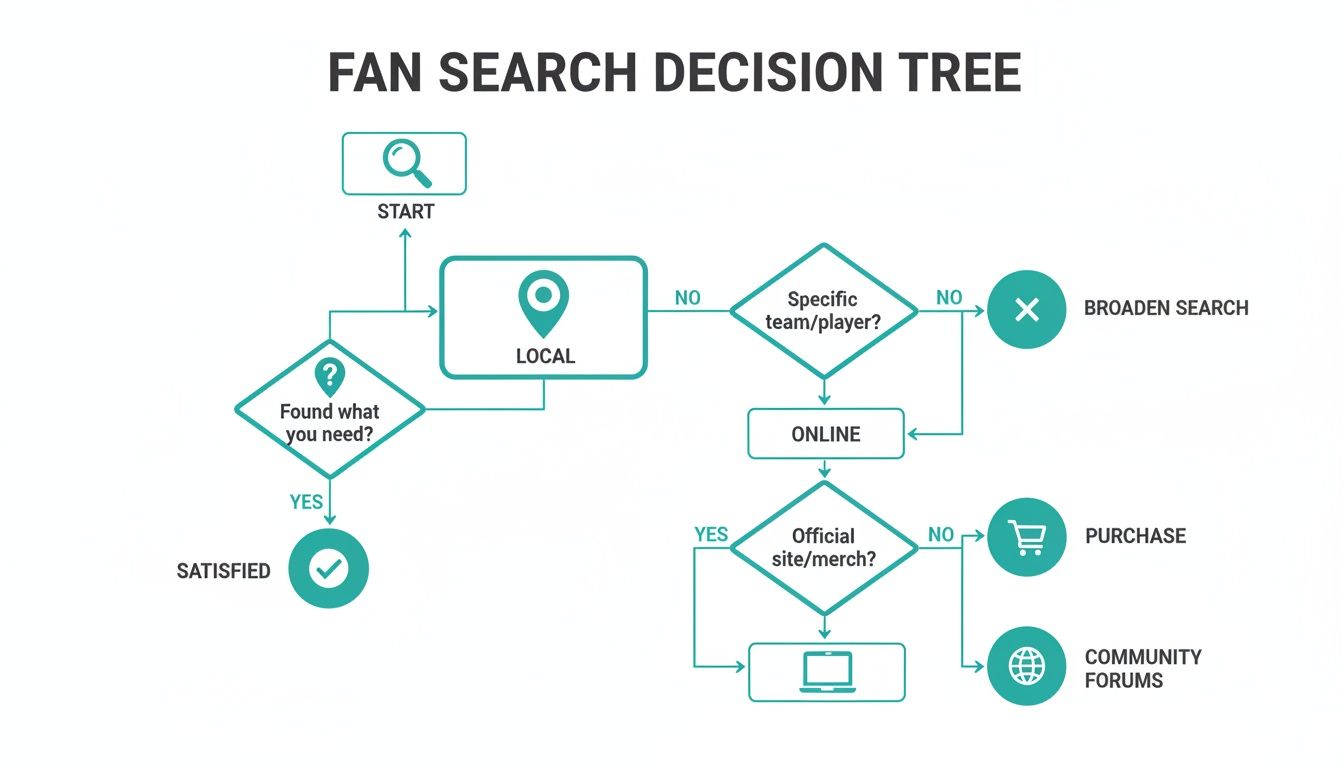
As you can see, both paths work just fine. The key is knowing which verification steps to take to ensure the fan you pick truly meets your smart home needs.
Wi-Fi vs. Hub-Based: What’s the Difference?
Next up is figuring out how the fan actually connects. Before you get too deep, it’s good to have a general sense of the standard smart home features and how they work. Most smart fans connect in one of two ways:
- Direct Wi-Fi: These fans connect straight to your home's Wi-Fi router, just like your phone or laptop. It's the simplest approach since you don't need any extra gear.
- Hub-Based (Zigbee/Z-Wave): These fans communicate through a central smart home hub, like one from Samsung SmartThings or Hubitat. This creates a dedicated, separate network for your smart devices, which can be faster and more reliable, especially if you have a house full of connected gadgets.
So, which one is for you? If you’re just dipping your toes into smart home tech or only have a handful of devices, a direct Wi-Fi fan will work great. But if you’re a power user with a complex, automated setup, a hub-based fan will likely give you better performance. Make sure you check which system your potential new fan uses.
Smart Fan Connectivity Types Compared
Understanding the core technology behind your smart fan's connection is key to ensuring it matches your home's setup.
| Connectivity Type | How It Works | Requires a Hub? | Best For |
|---|---|---|---|
| Wi-Fi | Connects directly to your home's Wi-Fi router. | No | Simple setups with fewer devices. |
| Zigbee | Uses a dedicated mesh network to communicate. | Yes | Homes with many smart devices needing a stable, low-power network. |
| Z-Wave | Creates its own mesh network on a different frequency than Wi-Fi. | Yes | Users prioritizing reliability and avoiding Wi-Fi interference. |
| Bluetooth | Connects directly to a nearby phone or smart speaker. | No | Basic, short-range control without whole-home integration. |
| HomeKit | Connects via Wi-Fi or Thread, certified by Apple for its ecosystem. | Yes (Apple TV/HomePod) | Apple users who want seamless integration with their devices. |
This table should clear up the main differences and help you zero in on the right tech for your home.
Always Read the Fine Print
Beyond the big logos, it pays to dig into the product specifications. This is where you’ll find the real details. Look for mentions of specific wireless protocols like Wi-Fi 2.4GHz, Zigbee 3.0, or Thread. A fan that only supports the 5GHz Wi-Fi band might struggle to connect, as most smart home gadgets still rely on the longer-range 2.4GHz band. For some great examples of clearly detailed specs, check out our collection of modern ceiling fans.
Remember: Compatibility isn’t just about the brand; it's about the technology inside. A fan might be from a top manufacturer but could use an older protocol that doesn't play well with your newer smart home system. Always verify the specifics.
This boom in smart home tech has been incredible to watch. The adoption of smart ceiling fans has skyrocketed, with over 60% of new installations in smart homes worldwide now featuring app or voice controls. It all comes down to convenience—scheduling a fan with Google Assistant so you never forget to turn it off can save an average household 5-10% on annual energy bills. By following this simple checklist, you can confidently find a fan that works for your home, your tech, and your wallet.
Bringing Your New Smart Fan to Life
You’ve found the perfect fan—now for the fun part. Getting your new smart ceiling fan installed and connected doesn't have to be a headache, but a little planning goes a long way toward a smooth, stress-free setup. This is where your investment in a high-quality model really starts to shine.
First things first: will you tackle the installation yourself or call in a professional? A DIY install can be a great weekend project if you're comfortable with basic wiring and your home’s electrical system is up to date.
But if you’re looking at older wiring or you're replacing a light fixture that wasn't braced for a fan's weight and wobble, hiring a licensed electrician is always the safest bet.
When to Call a Licensed Electrician
The DIY-vs-pro decision usually boils down to safety and complexity. An electrician will make sure the junction box is properly braced to handle the fan's weight and motion—a critical step that’s easy to overlook but essential for safety.
It's probably time to call a pro if:
- You’re installing a fan where only a light fixture used to be.
- Your home has older wiring, like knob-and-tube or aluminum.
- You’re even slightly unsure about any part of the electrical work.
For premium models like the elegant Chisel or the powerful Andros, a professional installation guarantees everything is done to code, protecting both your investment and your home.
Getting Connected The Smart Way
Once your fan is securely mounted, you get to connect it to your smart home. This process is usually pretty straightforward, starting with a quick trip to your phone's app store to download the manufacturer's app.
From there, you’ll follow the on-screen steps to get the fan on your Wi-Fi. Here’s a pro tip that solves most initial setup headaches: make sure your phone is connected to your 2.4GHz Wi-Fi band during the process. Most smart devices prefer this frequency for its longer range, and trying to pair on a 5GHz band is a classic recipe for a "connection failed" error.
With the fan on your network, the final piece is linking it to Amazon Alexa or Google Home. This usually just involves enabling a "skill" or "service" in your smart home app and signing into your fan manufacturer's account to give it permission.
A smooth setup is the hallmark of a quality smart fan. Premium brands invest heavily in user-friendly apps and clear instructions because they know a frustrating pairing process can sour the whole experience.
Troubleshooting Common Pairing Problems
Of course, technology doesn't always cooperate on the first try. If you hit a "fan not found" or "unresponsive device" error, don't panic. There are a few simple things to try before you even think about calling customer support.
First, double-check that you’re on the 2.4GHz Wi-Fi network. Next, try a good old-fashioned power cycle—just flip the circuit breaker off for 30 seconds and then back on. This simple reboot often clears up temporary connection glitches.
Finally, make sure your fan isn't too far from your router. A weak Wi-Fi signal can be just enough to prevent a stable connection from forming.
Why Investing in a Premium Smart Fan Pays Off
It's easy to look at a smart ceiling fan and think it's just a slick gadget, but a genuinely high-quality fan is a long-term upgrade for your entire home. While the temptation to grab a budget model is real, making the move to a premium fan—typically in the $300 and up range—is an investment that pays you back in comfort, style, and efficiency every single day.
The difference isn't just a number on a price tag. It's in the build, the performance, and how it feels to live with it.
So, what are you really getting when you step up to a premium model? It all starts with what’s inside. Top-tier fans are crafted with superior materials—think solid wood blades and die-cast metals. These materials don’t just look incredible; they're also perfectly balanced for a smooth, wobble-free spin.
The Power of a Superior Motor
The real hero in these fans is the whisper-quiet DC motor. If you've ever been annoyed by the constant hum of an old fan, you'll appreciate this. Unlike the noisy AC motors in most cheaper models, DC motors are incredibly energy-efficient and operate in near silence. That alone makes them a game-changer for bedrooms and other quiet spaces.
These advanced motors also give you much finer control over speed, letting you dial in a gentle, more natural-feeling breeze. Plus, a premium fan is almost always backed by a beefy warranty that often covers the motor for life. That’s some serious peace of mind.
Design That Defines a Room
Let’s be honest: a ceiling fan can make or break a room's aesthetic. Premium fans are designed to be stunning centerpieces, not just afterthoughts. They seamlessly blend powerful performance with a designer's touch, elevating the whole space.
Just look at a couple of examples of these high-end statement pieces:
- The Cabana: With its wide, tropical-style blades, this fan can turn a sunroom or covered patio into a genuine oasis. You can almost hear the ocean waves.
- The Basic Max: This one nails the minimalist look. Its clean lines are a perfect match for modern interiors where it provides massive airflow without drawing too much attention.
These models prove you don't have to sacrifice looks for performance. A great fan contributes to your home’s feel, and for more on that, you might want to check out these effective indoor air quality improvement tips.
A high-end fan isn’t just an appliance; it's a piece of functional art. It contributes to your home's air quality, comfort, and design in a way that standard models simply can't match.
Advanced Smarts for a Better Life
Better materials and a quiet motor are great, but the smarts are where premium models really pull away from the pack. We're talking about features that go way beyond just asking Alexa to turn on the fan.
Many high-end fans come with environmental sensors that automatically adjust fan speed based on the room's temperature and humidity. It's set-it-and-forget-it comfort. Some even have advanced scheduling that can mimic a natural breeze by subtly changing the fan speed.
This is the kind of thoughtful automation that truly sets a premium smart fan apart. It’s an investment that makes your home smarter, more comfortable, and a little more beautiful.
Common Questions About Smart Ceiling Fans
Let's dig into some of the most common questions people have when they're on the hunt for a smart ceiling fan. Getting these sorted out is the last step before you can feel totally confident in your choice.
Even if you’re eyeing a brand-new fan, chances are you’re wondering about the one you already have. So, let’s start right there.
Can I Make My Existing Ceiling Fan Smart?
Yes, in many cases, you can! You can find universal smart fan controllers or special wall switches designed to give your old fan a bit of a modern brain. These gadgets hook up to your Wi-Fi, letting you control the fan with an app or your voice.
Just keep in mind, compatibility isn't a sure thing with every single fan model out there. These add-on kits might not offer the perfectly smooth integration or the full suite of features you'd get from a fan built to be smart from the ground up. For the most reliable, feature-rich experience, an integrated smart fan is almost always the better way to go.
Do Smart Ceiling Fans Work If My Wi-Fi Goes Down?
Absolutely. This is a huge sigh of relief for a lot of homeowners. If your internet connection decides to take a vacation, you'll temporarily lose the "smart" perks like voice commands and app control.
But the fan itself will still work just fine using its physical remote control or the wall switch. This design ensures you’re never left without basic control over your airflow and light, no matter what your router is up to. Any automated schedules you've set will just hit pause until the connection comes back online.
What's the Difference Between a Wi-Fi Fan and a Bluetooth Fan?
The main difference is all about how they connect to your devices and your home. Nailing this down is key to picking the right technology for how you live.
- Wi-Fi Fans: These connect directly to your home's router. This is the magic that lets you control the fan from anywhere you have an internet signal and enables direct integration with voice assistants like Alexa and Google Assistant. It’s really the gold standard for a truly connected smart home.
- Bluetooth Fans: These pair directly with your phone, but only when you're within range—usually about 30 feet. They don't need a Wi-Fi network to work, but you lose the ability to control them when you're away from home, and they typically don't offer direct voice assistant integration.
Most premium smart fans, especially those in the $300+ price range, use Wi-Fi. It just offers superior range, flexibility, and integration capabilities for the most complete and convenient smart experience.
Ultimately, it all comes down to how you plan to use your fan. If you want full home automation and the power to control it from anywhere, Wi-Fi is the clear winner.
Ready to find the perfect smart fan with all the right features? At Fan Connection, we make it simple to filter by style, brand, and smart compatibility, ensuring you find a model that seamlessly integrates into your home. Explore our curated collections and bring intelligent comfort to your space today.


