



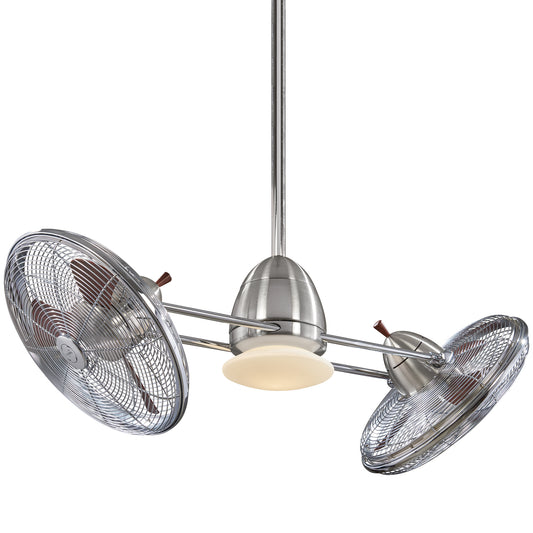














Find ceiling fans that come with smart home integration: A Quick Buyer's Guide
When you’re looking to find a ceiling fan that syncs up with your smart home, you’ll want to look past the basic models. The real magic happens with premium, design-forward fans that have Wi-Fi or smart hub compatibility built right in. Forget the pull-chain; this is about stepping into a world of voice commands and automated comfort.
These aren’t your grandma’s ceiling fans. High-end models aren't just about moving air; they're statement pieces packed with technology. Take the stunning 60" Aviation DC Motor Smart Ceiling Fan, which often sells for over $500. It comes with a dedicated app and integrates seamlessly with Alexa, Google Home, and other smart assistants. It's the kind of upgrade that transforms a room's look and feel.
Beyond The Pull-Chain: Welcome To The Smart Fan Era
Let's be honest, the days of fumbling for a pull-chain in the dark or trying to guess which speed is just right are thankfully behind us. Bringing a ceiling fan into your smart home isn't just a cool party trick—it's about creating an environment that responds to you. This move from manual switches to automated comfort fundamentally changes how you manage your home's climate. It's a leap into pure convenience and efficiency.
Imagine this: your fan automatically kicks on to a gentle breeze the moment your smart thermostat senses the room is getting a little too warm. You stay comfortable, your AC gets a break, and you didn't have to lift a finger. That's the new standard of modern living.

Why Smart Fans Are The New Normal
This upgrade is more than just a matter of convenience; it’s part of a much bigger shift in home technology. The global market for smart ceiling fans is booming, valued at USD 521.6 million in 2025 and set to climb fast. Why? Homeowners are demanding energy-efficient, connected devices, and North America is leading the charge with its smart tech adoption.
For anyone planning a lasting home upgrade, this means curated collections that blend style with intelligence are becoming the go-to. The benefits are pretty clear:
- Effortless Comfort: Program your fan to keep the perfect temperature, or just tell your voice assistant to dial the speed up or down.
- Energy Efficiency: Sync your fan with your thermostat to circulate air more effectively. It gives your HVAC system a much-needed break and can lower your energy bills.
- Enhanced Ambiance: Many smart fans come with dimmable LED lights that have adjustable color temperatures, letting you set the mood for any occasion.
- Seamless Integration: A good smart fan feels like a natural extension of your connected home, working in harmony with your other smart gadgets.
This guide will walk you through exactly how to find a ceiling fan with smart home integration, making the upgrade stylish and surprisingly simple. For more style inspiration, you can also check out our guide on how to choose the best modern ceiling fans.
Understanding Smart Home Languages
Jumping into the world of smart fans can feel a bit like trying to learn a new language. You'll see terms like Wi-Fi, Zigbee, and Z-Wave thrown around, but what do they really mean for your fan? Think of these as different ways smart devices talk to each other and to you. Getting the right one is the key to finding a fan that integrates seamlessly into your smart home without giving you a headache.
Most of us are already fluent in Wi-Fi. It’s what connects your phone, laptop, and smart TV directly to your home's internet router. A Wi-Fi-enabled fan offers a simple, direct connection without needing any extra hardware. This makes the setup incredibly straightforward—you just connect it to your network like any other device you own.
But when your house is full of Wi-Fi gadgets, things can get a little crowded, potentially slowing everything down. That’s where the other “languages” come in.
Beyond Standard Wi-Fi
Protocols like Zigbee and Z-Wave create their own dedicated "mesh" networks, totally separate from your Wi-Fi. Instead of every single device shouting at your router for attention, they talk to each other, passing signals along the chain. This creates an incredibly reliable and responsive system that won't bog down your internet connection.
The trade-off? They usually need a central hub (like an Amazon Echo with a built-in Zigbee hub or a dedicated Z-Wave hub) to act as a translator between their language and your router.
If you really want to get into the weeds of how these devices communicate, this guide on choosing the right smart home protocol is a fantastic resource.
Smart Fan Communication Protocols Compared
To help you decide which technology is the best fit for your home's ecosystem, here’s a quick side-by-side comparison of the most common protocols you'll encounter when shopping for a smart fan.
| Protocol | How It Works | Hub Required? | Best For |
|---|---|---|---|
| Wi-Fi | Connects directly to your home router. | No | Simplicity and users with just a few smart devices. |
| Zigbee | Creates a dedicated, low-power mesh network. | Usually Yes | Homes with many smart devices needing a fast, responsive network. |
| Z-Wave | Creates a reliable, low-frequency mesh network. | Almost Always | Serious smart home enthusiasts who want maximum reliability and minimal interference. |
| Bluetooth | Short-range connection directly to your phone. | No | Basic control when you're in the same room; not for remote access. |
Ultimately, there's no single "best" option. It all comes down to what you already have in your home and what you're planning to add down the road.
Key Takeaway: If you're just dipping your toes into the smart home world and want to control a fan or two, a Wi-Fi model is a fantastic, hassle-free choice. But if you're building out a fully connected home with dozens of devices, a hub-based system using Zigbee or Z-Wave will give you that rock-solid performance you need.
Understanding these differences is the first step to avoiding the frustration of buying a fan that doesn't play nicely with your other gadgets. It’s a lot like making sure a new smart wall switch can actually "talk" to your fan. You can learn more about how a ceiling fan wall switch integrates with these systems for total control. The goal is to build a setup where everything speaks a common language, creating a truly automated and responsive home.
How To Confirm Ecosystem Compatibility
There's nothing worse than the buzzkill of unboxing a shiny new 'smart' fan only to discover it doesn't play nicely with your Alexa, Google Home, or Apple HomeKit ecosystem. It's a common frustration, but a little homework upfront can make all the difference. Think of this as your pre-flight checklist to guarantee a smooth connection from day one.
The easiest first step is to look for the "Works with" badges. These are your golden tickets. When you’re browsing a product page, just scroll through the images or peek at the specifications section. You’re hunting for those familiar logos: "Works with Amazon Alexa," "Works with Google Assistant," or the Apple HomeKit icon. These are official certifications, giving you the best shot at a headache-free setup.
Beyond The Box Badges
While those logos are a great start, I always recommend digging a little deeper. The true performance of a smart fan often comes down to its dedicated mobile app. Before you decide on a premium fan, like the powerful 52" Axis Smart Ceiling Fan that can cost over $400, take two minutes to find its control app on the Apple App Store or Google Play Store.
Reading the user reviews is like crowdsourcing advice from hundreds of people who've already been through the setup process. Are they complaining about the fan constantly dropping its Wi-Fi connection? Is the Google Home integration buggy and unreliable? This is where you find the real-world scoop, and it's priceless for finding a fan that's not just smart on paper, but smart in practice.
This initial check also helps you figure out whether you'll be dealing with a direct Wi-Fi setup or if a smart hub is in your future. This little infographic breaks it down.

As the chart shows, your existing home network—whether it’s a simple Wi-Fi router or a more advanced smart hub—is the starting point for picking the right fan.
A Practical Compatibility Check
Let's walk through a real-life example. Say you're eyeing the bold, modern 52" Bowie Smart Ceiling Fan for your living room, which is a premium model priced over $300. You’ve already spotted the "Works with Alexa" badge on the product page. Great! Here's what to do next:
- Check the App: Search for the fan’s specific control app in your phone's app store. Quickly scan recent reviews for any mentions of "Alexa" or "voice commands." Lots of positive feedback is a very good sign.
- Verify Hub Needs: The product description says it's "Wi-Fi enabled," which is code for "no extra hub needed." It will connect directly to your network and, from there, to your Echo device.
- Confirm the Skill/Action: With Alexa or Google, you almost always have to enable a "Skill" or "Action" in their respective apps to link everything together. A quick search for the fan brand's skill will confirm it’s available and, hopefully, well-rated.
Taking these few extra minutes is what ensures that when you say, "Alexa, set the living room fan to medium," it just works. This little bit of diligence is what separates a frustrating gadget from a truly seamless part of your smart home.
Choosing Between Integrated Smarts and Retrofit Kits
When you’re ready to bring smart home control to your ceiling fan, you’ll run into a classic fork in the road. Do you go for a brand-new fan with all the smart tech built right in, or do you upgrade a fan you already love with a retrofit kit? Both routes have their perks and, let's be honest, potential headaches.
An all-in-one smart fan is almost always going to give you the most seamless, headache-free experience. When a fan is designed from the ground up to be "smart"—especially models in the $300+ range—you can trust that every single component is made to work together perfectly. From the motor and receiver to the app on your phone, it’s a closed system. There’s no guesswork, and the whole experience just feels more polished.

The Integrated Advantage
The biggest win for an integrated smart fan is that it just works right out of the box. You're not just buying a fan; you're buying a complete, factory-tested system.
- Guaranteed Compatibility: No crossing your fingers, hoping a third-party switch plays nice with your fan’s motor. Every part is designed to communicate flawlessly.
- A Polished App Experience: The big names in smart fans sink a lot of money into their software. That translates to a user-friendly app, reliable updates, and actual customer support if you hit a snag.
- Access to All Features: You get to use every cool feature the fan offers—like special breeze modes, precise light temperature control, or advanced scheduling—that a generic retrofit kit might not support.
This unified approach is why models like the striking 60" Aviation or the minimalist 52" Axis are so popular. The smart features feel like a core part of the product, not some clunky add-on.
When Retrofitting Makes Sense
On the other hand, what if you already have a high-quality fan that’s the perfect centerpiece for your room? A retrofit kit—like a smart wall switch or an in-canopy receiver module—can be a brilliant way to bring it into your connected home without a full replacement. This path is often friendlier on the wallet and lets you keep a fixture you love.
But this route does demand a bit more from you. You’ll need to be comfortable with some basic electrical wiring, for starters. Compatibility can also be a minefield. Not all kits work with all fan motors, especially older AC models or fans with complicated light setups.
Pro Tip: Before you even think about buying a retrofit kit, double-check that it’s compatible with your exact fan model. Make sure it can handle your fan's motor type (AC vs. DC) and any built-in lighting. A few minutes of research can save you from a world of installation frustration.
So, which is right for you? It really comes down to your priorities. If you want a guaranteed, feature-rich experience with zero hassle, an integrated smart fan is the clear winner. If you're working with a tighter budget, enjoy a good DIY project, and don't mind doing a little homework, retrofitting can be a super rewarding alternative.
A great first step is understanding the basics of how your fan is controlled, which you can learn more about in our guide on remote control ceiling fan systems.
Where To Find The Perfect Smart Fan For Your Home
Alright, you've got the smart home basics down. Now for the fun part: finding the perfect fan for your space. Hunting for a smart ceiling fan online can feel a bit overwhelming, but I'll show you how to cut through the noise and find exactly what you need.
First things first, use the filtering tools on a specialty retailer site. Don't waste time scrolling through hundreds of fans that don't fit your vision. Start by narrowing things down by collection. For instance, if you're trying to move a lot of air in a big great room, the 5 Blade collection is the right place to start. Or, if you're going for more of a laid-back, coastal vibe, check out the Tropical collection. You'll find stylish options in there that nail the resort aesthetic without skimping on smart features.

Insider Shopping Tips
Once you've zeroed in on a style you like, it's time to play detective with the product descriptions. This is where you confirm that a fan is truly "smart" and will work with your setup. Keep an eye out for these specific phrases:
- "Wi-Fi enabled" or "Smart Fan": This is the gold standard. It tells you the fan connects directly to your network without needing an extra hub.
- "Works with Alexa" or "Google Assistant Compatible": If you love voice commands, these phrases confirm you're good to go.
- "App Control": This means the fan has its own smartphone app, giving you control right from your phone.
Paying close attention here is key. The smart fan market is booming—it's expected to jump from USD 1.05 billion in 2026 to USD 1.45 billion by 2032, and homeowners like you are driving 71.81% of that growth. More options are great, but it also means you really have to double-check the features before clicking "buy." If you're interested in the nitty-gritty, you can learn more about smart fan industry growth and see just how popular these are becoming.
By using the site's filters and then carefully scanning the product details, you can confidently pick out a high-end fan—which often run $300 or more—that doesn't just look great but also slides seamlessly into your connected life.
This approach ensures you get the best return on your investment, something we talk about more in our guide on the best places to buy ceiling fans.
Common Questions About Smart Fans
When you start diving into the world of smart ceiling fans, a few key questions always pop up. We hear them all the time from shoppers trying to figure out the best fit for their home. Let's tackle these common concerns head-on so you can shop with total confidence.
Do All Smart Ceiling Fans Need A Hub?
Not anymore, which is great news for keeping your setup simple. Many of today’s top smart fans, especially in the premium category, connect directly to your home’s Wi-Fi network. This means you can control them right from a smartphone app or with voice assistants like Alexa and Google Assistant without any extra gear. They're by far the most straightforward to get up and running.
However, some fans are designed to work on Zigbee or Z-Wave protocols. These systems do require a compatible smart home hub. The big advantage here is that they create a more stable, dedicated network for all your smart devices. If you've already got a home full of connected gadgets, this can be a huge plus for reliability.
Shopping Tip: Always look for "Hub Required" versus "Wi-Fi Enabled" in the product specs. This small detail tells you everything you need to know about whether a fan will play nicely with your current smart home setup.
Can I Make My Current Ceiling Fan Smart?
You absolutely can! If you have a classic fan you love but are craving smart features, retrofitting is a fantastic option. It’s a popular route for people who want modern convenience without ditching a fixture that perfectly ties their room together.
There are two main ways to pull this off:
- A Smart Ceiling Fan Wall Switch: This replaces your existing wall switch, giving it Wi-Fi smarts for app and voice control.
- An In-Canopy Universal Remote Module: This is a small receiver that you install inside the fan's canopy (the part against the ceiling). It connects to your Wi-Fi and relays commands to the fan.
Both solutions work great, but they do require a bit of basic electrical know-how. If you're going the DIY route, our guide on how to wire a ceiling fan switch offers some helpful background. Just double-check that the kit you choose is compatible with your fan’s motor type.
What Happens If My Internet Goes Down?
This is a really practical concern, but don't worry—you won't be left in a stuffy, powerless room. When your internet connection drops, you'll temporarily lose the ability to use the app or voice commands for your Wi-Fi fan. Any automated schedules you've set up won't run during the outage, either.
But here’s the good news: nearly every smart fan still comes with a physical remote control or wall panel. These operate on a local radio frequency (RF), meaning you can always control the fan's essential functions—like speed and lighting—directly, no internet required. Everything will seamlessly reconnect and go back to normal once your Wi-Fi is back online.
Are Smart Fans Really Worth The Extra Cost?
It's true that smart ceiling fans have a higher upfront price, but it's best to think of it as an investment in both convenience and long-term savings. Premium smart fans, which often start around $300, are built with superior components, like ultra-quiet and highly efficient DC motors.
The real value shows up over time. Being able to schedule your fan to run only when needed, or sync it with a smart thermostat, can lead to real savings on your energy bills. That efficiency helps offset the initial cost, all while giving you a massive upgrade in daily comfort and control.
Finding a smart ceiling fan that seamlessly integrates into your home is about blending high-tech convenience with personal style. We hope this guide has made that search a lot less intimidating and a lot more exciting.


