



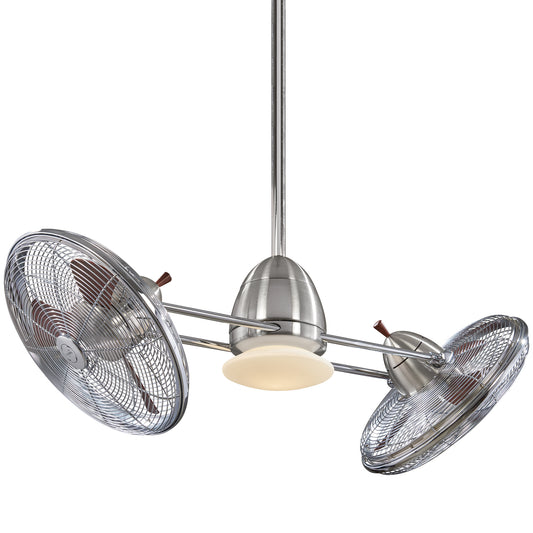














Fan Smart Control: Your Complete Guide
You’re probably here because your current fan setup is annoying in a very specific way. The pull chain is never where you want it. The remote vanishes into the sofa. One room feels stuffy while another feels like a wind tunnel. And if you’re updating your home, you’ve likely noticed that modern ceiling fans now promise app control, voice commands, schedules, and automation.
That sounds great until the next question shows up. What does fan smart control mean, and will it work in your house without turning a simple upgrade into a wiring puzzle?
The good news is that smart fan technology is easier to understand than it first appears. Think of it less like a gadget and more like a comfort system. A well-chosen smart fan doesn’t just spin. It responds, adjusts, and fits the way you live, whether you’re renovating a primary bedroom, finishing a covered patio, outfitting guest rooms, or specifying fans for a design project.
Beyond the Pull Chain An Introduction to Smart Airflow
A traditional ceiling fan asks you to manage everything yourself. You turn it on. You decide the speed. You remember to turn it off. Then the weather changes overnight, and the fan is still running at the same setting the next morning.
That old routine works, but it doesn’t feel very elegant. In a well-designed home, comfort should feel easy.

Smart control changes the experience. Instead of treating a fan like a basic fixture, it turns the fan into part of your daily rhythm. You can set a gentle bedtime breeze in the bedroom, schedule stronger airflow in the living room during warm afternoons, or control the fan without leaving the couch.
For many homeowners, that’s the moment smart control starts to make sense. It isn’t about showing off an app. It’s about removing friction from a room you use every day.
Where people usually get stuck
Most confusion starts with one of these questions:
- Will it work with my existing wiring
- Do I need a new fan or just a new control
- Can I use my phone, voice assistant, wall switch, or all three
- Will a smart setup make the room feel better, or just feel more complicated
Those are fair questions. A smart fan should simplify life, not add one more thing to troubleshoot.
If you want a broad overview of how smart ceiling fans fit into everyday living, this simple guide to cooler rooms with ease is a helpful starting point.
Smart airflow feels best when you stop noticing the control itself and only notice that the room stays comfortable.
What Exactly Is Fan Smart Control
At its simplest, fan smart control is a way for a ceiling fan to adjust more intelligently than a basic on-off switch allows. A standard fan gives you a few fixed choices. A smart fan system adds logic. It may respond to an app, a thermostat, a schedule, a voice assistant, or built-in electronics that smooth out speed changes.
A useful analogy is this. A smart thermostat manages temperature with more nuance than an old manual dial. Smart fan control does the same for airflow.
The plain-English version
A basic fan says, “Tell me what speed to run.”
A smart fan says, “Tell me what kind of comfort you want, and I’ll help maintain it.”
That can mean:
- Scheduling airflow so the fan turns on before a room gets stuffy
- Remote access so you can change settings without being in the room
- Smoother speed control instead of abrupt jumps between low, medium, and high
- Automation that works with other devices in your home
This shift isn’t a niche trend. The global smart fans market was valued at USD 974 million in 2024 and is projected to reach USD 1,407 million by 2032, reflecting a 4.7% CAGR. The same source notes that pulse-width modulation (PWM) can reduce energy use by 20-40% over older control methods by enabling smooth speed adjustments.
What PWM means without the engineering headache
PWM sounds technical, but the idea is approachable. Instead of wasting energy by crudely reducing power, PWM rapidly pulses power in a controlled way so the fan can run at the speed you desire.
This is comparable to tapping a car’s accelerator with precision instead of flooring it and slamming the brake. The result is smoother control, better efficiency, and a more refined feel.
For homeowners, that usually translates into three visible improvements:
| Smart control feature | What you notice at home |
|---|---|
| Smoother speed changes | The fan ramps gently instead of jolting |
| App or automation support | You don’t have to keep reaching for a switch |
| More efficient motor control | The fan can maintain comfort with less waste |
If you’re comparing models, this overview of ceiling fans with smart home integration options can help you sort out what “smart” includes on different products.
Why buyers care now
People upgrading a fan today usually want more than airflow. They want a fixture that suits the room visually and behaves like the rest of a modern home. That’s why smart control is showing up in bedrooms, kitchens, patios, rental properties, and hospitality spaces.
It also helps that the technology has become more approachable. You no longer have to be a dedicated home automation hobbyist to use it well.
The Different Languages of Smart Fan Communication
Two smart fans can look nearly identical and behave very differently because they “speak” different control languages. That’s where many buying mistakes happen. A homeowner sees “smart” on the box and assumes every system connects the same way.
They don’t.

RF for straightforward everyday control
RF, or radio frequency, is what many remote-controlled ceiling fans use. It doesn’t need line of sight the way some older remotes do. You press a button, and the fan responds.
RF is great for people who want simplicity. It feels familiar, and it usually works well in a single room.
Best fit: bedrooms, guest rooms, straightforward remodels
Less ideal: homes where you want deeper phone-based automation across multiple devices
Wi-Fi for control from anywhere
Wi-Fi is commonly the first option that comes to mind when “smart fan” is heard. If the fan connects to your home network, you can often use an app, voice assistant, and remote access.
That means you can adjust a fan while away from home, create scenes, or fold fan control into broader routines.
- Strong point: Works well for app users and homes already using voice control
- Watch for: Setup can be more involved, and network reliability matters
Zigbee and Z-Wave for bigger smart home systems
These are often the choice for homeowners or integrators who want a more coordinated automation setup. Instead of every device relying on Wi-Fi, Zigbee and Z-Wave often operate within a dedicated smart home framework.
That makes them appealing in larger projects or homes with lots of connected devices.
Practical rule: If you want a fan to be one polished part of a broader smart home, Zigbee or Z-Wave may fit better than treating every fixture as its own separate Wi-Fi product.
Bluetooth for local, room-level simplicity
Bluetooth usually works best for direct, short-range control. It can be easy to set up because you pair a phone or controller directly with the fan.
That simplicity has a tradeoff. Bluetooth is often better for in-room control than for whole-home automation.
A quick side-by-side view
| Communication type | Best for | Main advantage | Main limitation |
|---|---|---|---|
| RF | Simple room control | Familiar remote use | Less advanced automation |
| Wi-Fi | App and remote access | Great convenience | Depends on network quality |
| Zigbee/Z-Wave | Integrated smart homes | Reliable ecosystem control | May require hub-based setup |
| Bluetooth | Local direct control | Easy pairing | Short-range use |
How to choose without overthinking it
You don’t need the most advanced protocol. You need the one that matches your home.
Choose based on how you live:
- You want a remote and nothing complicated: RF makes sense.
- You already use voice assistants and apps every day: Wi-Fi is often the easiest fit.
- You’re building a serious connected home or managing many devices: Zigbee or Z-Wave deserves a look.
- You want simple nearby control in one space: Bluetooth can be enough.
If you’re still sorting out the difference between built-in smart features and classic remote operation, this guide to a remote control ceiling fan helps clarify what each setup does well.
Unlocking the Real Benefits of a Smarter Breeze
You walk into the bedroom after a long day, and the air feels right without anyone reaching for a chain, remote, or wall control. That is the point of smart fan control. It turns airflow into something your home handles for you, instead of one more thing to manage.

Better comfort without constant adjusting
The biggest day-to-day benefit is consistency. A smart fan helps keep airflow in the comfort zone instead of swinging between too much and too little.
That sounds small until you live with it.
In a regular setup, the fan often gets turned on high, then forgotten. A smarter setup works more like a dimmer for comfort. It can respond in smaller steps, which makes the room feel steadier and more intentional. For homeowners updating an older fan or choosing a new one, that is where the technology starts to feel useful instead of flashy.
Energy savings come from better control
A fan saves energy when it runs at the speed the room needs. According to Microchip’s smart PID fan control analysis, fan power often follows the cube law, P ∝ RPM³. That’s why a 20% speed reduction can cut power use by nearly 50%. The same analysis notes that smart PID control can potentially save 40-70 kWh annually per fan.
The practical lesson is simple. Small speed changes can have an outsized effect on power use.
That matters in real homes because comfort is rarely all-or-nothing. On many days, you do not need maximum airflow. You just need enough movement to keep the room feeling fresh. For a broader look at efficiency habits beyond ceiling fans, this article on Smart Home Savings offers useful context.
A smarter fan often feels more polished
Good fan control is a lot like good lighting. You notice it most when it does not call attention to itself.
A well-managed fan avoids harsh jumps in speed and unnecessary run time. The result is a room that feels calmer, with less sense of mechanical strain and less chance of overcooling. That is especially appealing in bedrooms, nurseries, offices, and reading spaces where comfort is tied to how the whole room feels, not just how much air is moving.
There is another benefit homeowners often miss. Better automation can also reduce the constant back-and-forth over settings in shared spaces. In a family room or open-concept area, that means fewer manual adjustments and a more consistent experience for everyone.
A short visual walkthrough can make these ideas click faster:
The benefits people notice first
- Mornings feel more comfortable because the room does not start stuffy
- Evenings feel more relaxing when airflow settles into a lower speed instead of staying too strong
- Changing seasons are easier to handle because the fan can match the room instead of staying fixed at one setting
- Shared spaces feel less fussy since people spend less time adjusting controls
- Connected homes feel more trustworthy when homeowners choose products with clear app permissions and sensible privacy settings
A smart fan works best when it avoids overcooling and keeps comfort steady in the background.
Ensuring Smart Fan Compatibility
A smart fan setup succeeds or fails long before the first app screen appears. The ultimate test is whether the fan, the control method, and your home’s wiring are built to work together.
A good way to picture it is this. Smart fan parts need to speak the same language. If one piece expects simple on and off commands and another expects a specific digital signal, the result can be odd behavior, limited speed control, or a fan that works only through one device and ignores the rest.

AC and DC motors follow different control rules
This is the first compatibility question to answer because it shapes almost every choice after it.
AC motor fans are usually more forgiving. Many work with traditional wall controls, and some can be upgraded with a compatible smart switch.
DC motor fans are more particular. They often rely on their own receiver and control logic, so an older wall control or a generic smart switch may not work properly. Hinkley’s smart fan control guidance points homeowners toward manufacturer-approved controls and Matter-ready options for better compatibility, especially with DC models.
If you are upgrading an existing fan, check the spec sheet before buying any control. If you are shopping for a new fan, ask whether smart control is built in, receiver-based, or switch-based.
A wiring reference also helps if you are sorting out what is already in the ceiling box. This ceiling fan wiring diagram with remote control can help you see how common control setups are arranged.
Compatibility is not only about electricity
A fan can be wired correctly and still feel frustrating if the software side is clumsy.
Homeowners usually want a fan to work with the system they already use every day:
- Amazon Alexa for voice control and routines
- Google Home for app-based household control
- Apple HomeKit for Apple-focused homes
- Matter for broader cross-platform support
That sounds simple, but product pages often compress a lot of detail into one phrase like "smart compatible." That can mean native app control, a required bridge, a bundled receiver, or voice control with fewer fan-speed options than you expected.
Privacy matters here too. A smart fan may collect app account details, device identifiers, usage history, or location-based routine data. Before you buy, check whether the app offers clear permissions, basic account security, and a privacy policy you can readily understand. Comfort should not come with mystery data sharing.
What this means in a real home
Here is a common upgrade mistake. A homeowner replaces a basic pull-chain fan with a stylish DC model, then tries to pair it with an older smart wall control already in the room. The fan turns on, but speed changes lag or fail because the control method was never designed for that motor.
That is why matching the control path matters. In many cases, the cleanest result comes from using the fan’s intended receiver and supported app ecosystem instead of forcing a third-party workaround.
A practical compatibility check before you buy
| Question | Why it matters |
|---|---|
| Is the fan motor AC or DC | It determines which controls can manage speed correctly |
| Does the fan require a receiver | Some smart features depend on that receiver being in place |
| Is smart control native, app-based, or tied to a bridge | This affects setup complexity and daily use |
| Does it support your preferred voice platform | It prevents disappointment after installation |
| Are the app permissions and privacy settings clear | It helps you avoid products with vague data practices |
A smart fan feels modern when the hardware fits your wiring, the controls fit your motor, and the app fits your comfort level with privacy.
Navigating Your Smart Fan Installation
Smart fan installation usually follows one of two paths. You either replace the wall control, or you add a receiver module in the fan canopy.
Both can work well. The right choice depends on your wiring, your fan motor, and how much you want to change.
Option one is a smart wall switch
This path feels the most familiar because control stays at the wall. It can look clean and intuitive, especially in a renovation where you want a finished, built-in appearance.
But wall switches have limits. Some require a neutral wire. Some are designed for certain motor types. And some work well for lights but not for fan speed control.
Option two is a receiver in the canopy
A canopy receiver hides in the fan housing area and acts as the control bridge between the fan and your app, remote, or smart ecosystem.
This option is often useful when:
- You want smart features without changing the wall box
- The fan manufacturer expects a receiver-based setup
- You’re working with a more complex motor and need the intended control path
Which route makes sense
Here’s a simple way to decide:
- Choose a wall switch if the fan and wiring support it, and you want a built-in control point.
- Choose a canopy module if the fan is designed for that method or if wall-switch compatibility is uncertain.
- Pause the DIY plan if you’re dealing with unknown wiring, multiple switched loads, or a motor type you can’t identify.
If you need a visual reference before opening anything, this ceiling fan wiring diagram with remote control is a practical place to start.
When DIY is fine, and when it isn’t
Basic replacement can be manageable for a careful homeowner who already has experience safely swapping fixtures and switches. The moment the project involves unclear wiring, an older electrical box, or a fan that behaves unexpectedly, it’s time to bring in a qualified electrician.
That isn’t overcautious. It’s the fastest path to a fan that works correctly the first time.
Clean installation beats clever improvisation. Smart controls are only enjoyable when the fan responds predictably every day.
How to Choose the Perfect Smart Fan at Fan Connection
You are standing in a room that still feels unfinished. The furniture works, the paint looks right, but the ceiling fixture is either dated, too basic, or missing the control options you want. A smart fan should solve both problems at once. It should improve comfort and finish the room visually, without creating new headaches around compatibility, setup, or privacy.
That is the buying filter we use at Fan Connection.
Start with how the room lives every day
A smart fan makes the most sense when its features match the way the room is used. Bedrooms usually benefit from quiet performance, easy dimming, and simple bedtime control. In a living room or great room, airflow coverage and visual scale matter more because the fan has to do real work while also holding its own in a larger design scheme. In a covered patio, moisture rating and finish durability matter just as much as app control.
A good shortcut is to ask one question first. What problem should this fan solve every day?
If the answer is better sleep, focus on low-noise operation and easy control from bed. If the answer is comfort in a busy family room, look for a model that suits the room size and gives you dependable speed control. If the answer is replacing an older fan without opening up a bigger electrical project, pay close attention to the control method and compatibility before you fall in love with the look.
Choose style and smart control together
Homeowners often shop in two separate lanes. First the fan has to look good. Then they check the app features. That split usually leads to compromise.
A better approach is to treat the fan like a lighting fixture with airflow. The finish, blade shape, and silhouette set the tone of the room. The smart control decides how pleasant that room feels to live in.
A few strong premium options to consider:
- Artemis XL5 ceiling fan for buyers who want a refined, design-forward statement piece
- Aviation ceiling fan for a more distinctive industrial-inspired look
- Andros ceiling fan for a bold modern profile in larger spaces
These fans work well when you want the ceiling fixture to contribute to the room instead of fading into the background.
Narrow your options faster
If you are still deciding on the visual direction, collections can help you sort the field before comparing exact control features.
| Shopping priority | Collection to browse |
|---|---|
| Balanced, versatile silhouettes | 5 blade ceiling fans |
| Cleaner contemporary styling | modern ceiling fans |
| High-impact dramatic profiles | 6+ blade ceiling fans |
Once you have a style direction, check how the fan is controlled. Some buyers want a wall control that feels familiar. Others want app scheduling, voice assistant support, or phone-based control for guests and family members. If you want a clearer picture of how those control options compare in daily use, this guide to a ceiling fan remote app and control options is a helpful next filter.
Ask the upgrade questions before you buy
This is the gap many shopping guides skip. A fan can be beautiful and feature-rich, yet still be the wrong choice for your home if it does not fit your existing setup.
For an upgrade, ask:
- Are you replacing an old standard fan or starting fresh in a new room?
- Do you want to keep a wall switch, use a handheld remote, or control the fan mainly from an app?
- Does the fan use the control method your home can realistically support without extra frustration?
- Will other people in the home understand how to use it without a tutorial?
That last point matters more than it seems. Smart control should feel natural. A well-chosen fan behaves like a good home system. It fades into the background until you need it.
Privacy and security belong in the buying decision
Smart convenience also means the fan becomes part of your home network. For some homeowners, that is a small detail. For others, it is a deciding factor, and reasonably so.
If you prefer fewer connected devices, choose a fan with only the smart functions you will use. If you plan to connect it to a broader smart home setup, read the brand's update policy, account requirements, and control options before purchase. Security questions are easier to handle before install than after the fan is already paired to your network. For a broader overview of critical IoT security issues, it helps to understand the risks that can come with any connected home device, not just fans.
A simple buying test
The right smart fan usually passes three checks:
- It suits the room visually
- It matches your home's control setup without unnecessary complexity
- It adds comfort you will notice in daily life
When those three line up, the purchase tends to feel smart long after installation day.
Troubleshooting Glitches and Securing Your Smart Fan
Most smart fan issues are ordinary, not dramatic. The app loses connection. A voice assistant stops seeing the device. A remote works, but automation doesn’t. Usually, the fix is simple. Confirm power, confirm pairing, and confirm that the fan is using the control method it was designed for.
If one control path works and another doesn’t, don’t reset everything immediately. Isolate the problem first. Check whether the issue is the fan, the app, the hub, or the home network.
Security deserves more attention than it gets
Smart convenience comes with responsibility. According to Reliant’s overview of smart ceiling fan security, 15% of IoT devices were targeted by botnets in 2025, and a 2026 FTC audit found 25% higher breach rates in shared smart home ecosystems. The same source notes that isolating devices on a guest Wi-Fi network or VLAN can reduce exposure by up to 80%.
That sounds technical, but the homeowner action is straightforward.
- Use a guest network or VLAN for smart home devices when possible
- Keep firmware updated on fans, hubs, and apps
- Avoid adding unnecessary bridges if native compatibility is available
- Remove devices you no longer use from your smart home account
For a broader look at critical IoT security issues, that resource gives helpful background on why connected devices need more thoughtful setup.
If your fan app or remote behavior is inconsistent, this guide to a ceiling fan remote app can help you think through the likely control path before replacing hardware.
A secure smart fan isn’t one that hides from your network. It’s one you’ve placed intentionally, updated regularly, and connected in the simplest supported way.
If you’re ready to upgrade comfort and style together, explore Fan Connection for premium ceiling fans, curated collections, and design-forward models that make smart airflow feel effortless at home.


