

















Hanging a Ceiling Fan: 2026 Installation Guide
That new fan box is probably sitting on the floor right now, still packed in foam, looking equal parts exciting and annoying. You know it’s going to make the room feel better. You also know hanging a ceiling fan means dealing with a ladder, wiring, ceiling hardware, and the small but real fear of dropping a screw into another dimension.
The good news is that this is one of the most satisfying home upgrades you can do when the setup is right. A fan changes comfort immediately, gives a room a finished look, and can help with year-round efficiency. According to Metzler Electric’s ceiling fan energy breakdown, a low-wattage fan can run for an entire week for less than 15 cents, strategic use with HVAC can reduce overall energy bills by up to 15%, and ENERGY STAR certified fans can be up to 44% more efficient than conventional models.
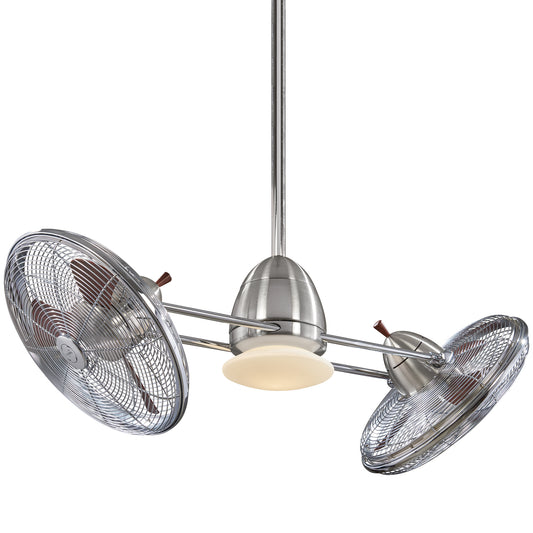
Some fans also earn their keep as design pieces. A sculptural model like the Artemis IV or a statement fan in the $300-and-up range, such as Amped, Axis, or Artemis XL5, can anchor a room as much as a light fixture or piece of furniture. Done right, the install feels less like a chore and more like the moment the room finally comes together.
Your Weekend Project The Ultimate Guide to Ceiling Fan Installation
A lot of people start with the same plan. Open the box. Lay out the blades. Hold the bracket up to the ceiling. Then the questions start. Is the existing box strong enough? Do I need a downrod? What’s this little receiver module? Why are there more wires than I expected?
That’s normal. Hanging a ceiling fan is one of those jobs that looks simple from the floor and gets more technical the second you’re on the ladder. Still, it’s manageable when you respect the order of operations. Secure support first. Wiring second. Final balancing last.

Why this project is worth doing
A ceiling fan pulls more weight than people give it credit for. In summer, it helps a room feel cooler. In winter, the reverse setting helps move warm air that collects near the ceiling. And if you choose a strong-looking fan instead of a builder-basic afterthought, it can change the whole personality of the room.
Here’s where higher-end models shine:
- Statement design: Fans like Aerovon and Artemis XL5 look intentional, not like something added at the end of a remodel.
- Better fit for large spaces: Big open living rooms and vaulted great rooms usually need more presence than a small flush-mount fan can deliver.
- Modern features: Premium fans often come with integrated controls, cleaner canopies, and smarter mounting options.
Practical rule: If the fan is going into your main living space, don’t buy only on price. You’ll look at it every day.
What separates a clean install from a frustrating one
The difference isn’t luck. It’s prep and discipline.
A good install usually follows this rhythm:
- Kill power and verify it’s off
- Confirm the ceiling box is fan-rated
- Match the mounting method to the ceiling type
- Make clean wire connections
- Level, tighten, and balance everything before calling it done
Miss the foundation and the rest of the job fights you. That’s especially true with smart fans and sloped ceilings, which trip up plenty of otherwise capable DIYers.
A ceiling fan should feel solid, quiet, and centered. If it hums, sways, or droops, something underneath it needs attention.
This guide sticks to what works in real rooms, including the two situations basic tutorials tend to skip over: vaulted ceilings and smart home wiring. If that’s the part making you hesitate, you’re in the right place.
Gather Your Gear Choosing the Right Fan and Tools
Before you touch the breaker, make sure the fan suits the room. Plenty of installation headaches start with the wrong model. A fan that’s too small looks lost and moves air poorly. A fan that hangs too low becomes a safety problem fast.
Industry guidance summarized by Amigo Energy’s ceiling fan overview says blades must be at least 7 feet above the floor for safety, with an optimal height of 8 to 9 feet for airflow. That same source notes ceiling fan history goes back to 1882, and today they’re present in approximately 80 million U.S. homes.
Choose the fan for the room, not just the photo
Open-concept spaces, tall ceilings, and covered patios all ask for different things. A compact bedroom fan and a dramatic great-room fan might both be beautiful, but they aren’t interchangeable.
Use this quick planning table before you buy:
| Room situation | What usually works best | What usually goes wrong |
|---|---|---|
| Standard bedroom | Moderate blade span, simple downrod or close mount if ceiling allows safe clearance | Oversized fan that dominates the room |
| Large living area | Long-blade statement fan like Artemis XL5 or Axis | Small fan that looks decorative but underperforms |
| Design-led space | Sculptural model like Aerovon or Artiste | Picking style first and forgetting mounting height |
| Covered outdoor area | Damp- or wet-location-rated fan | Installing an indoor fan where moisture can reach it |
If you’re still narrowing the field, a good buying resource is this ceiling fan buying guide, especially for comparing styles and room applications. For visual inspiration, blade-heavy statement looks and island-friendly options are often the most interesting categories to browse. Tropical and multi-blade styles can be especially strong in larger rooms where a basic fan disappears.
Tools that make the job smoother
You don’t need a van full of electrician gear, but you do need the right essentials. Missing one small tool can turn a tidy install into a long afternoon.
Bring these to the room before you start:
- Sturdy ladder: Tall enough that you’re working comfortably, not reaching from the top cap.
- Voltage tester: This is your safety check, not an optional extra.
- Screwdrivers and nut drivers: Many fan kits use a mix of machine screws and small housing screws.
- Wire stripper and cutter: Clean copper makes better connections.
- Pliers: Helpful for set screws, downrod pins, and stubborn wire nuts.
- Level: Handy for bracket alignment and visual sanity.
- Drill or driver: Especially useful if you’re replacing the box or brace.
The one item you can’t fake
The fan-rated electrical box is non-negotiable. A standard light box might hold a fixture just fine, but a fan adds movement and vibration. That dynamic load changes everything.
Look for packaging or markings that clearly indicate the box is rated for ceiling fan support. If you can’t confirm that, stop and replace it before hanging anything.
The fan you choose should match three things at once: room size, ceiling shape, and mounting height.
A final buying note. If you’re upgrading a feature room and want the fan to read as furniture instead of hardware, the $300-plus category starts making sense. Models like Amped, Bowie, Axis, and Artemis IV tend to justify the spend through finish quality, motor housing design, and better integration with contemporary interiors.
Building a Safe Foundation Securing the Electrical Box
Most bad fan installs don’t fail at the blades. They fail above the canopy. The bracket is loose, the box was never meant to hold a moving fixture, or the support is anchored to something that flexes. That’s why the least glamorous part of hanging a ceiling fan is also the most important.
According to Ocean Electric’s installation guidance, using a standard junction box is a critical error because it carries a 70% failure risk, while inadequate support accounts for 40% of all DIY installation failures that lead to wobbling, noise, and potential falls.

Start with a hard power check
Turn off the breaker. Then verify the circuit is dead with a tester at the ceiling box. Never trust the wall switch alone, and never trust a handwritten panel schedule without checking.
Once you remove the old light or fan, inspect the box carefully. If it looks lightweight, loosely mounted, or unfamiliar, don’t guess. Swap it.
What a proper support setup looks like
A solid fan support setup usually includes a fan-rated box attached directly to a ceiling joist or secured with a fan brace spanning between joists. In retrofit situations, the expandable brace method is often the cleanest answer because you can install it through the existing ceiling opening.
Here’s the basic sequence that works well:
- Remove the old fixture and bracket so the opening is clear.
- Check the existing box for fan rating and firmness.
- Install a fan brace if there’s no direct joist location where the fan needs to sit.
- Attach the fan-rated box to the brace or joist.
- Fasten the mounting bracket supplied with the fan and confirm it sits level.
If you want a useful primer on different types of electrical boxes, that reference helps sort out why a light box and a fan box are not the same animal.
Common mistakes that create future wobble
A common pitfall for DIY installs is:
- Drywall-only support: If the box isn’t structurally anchored, the fan will tell on you.
- Loose bracket screws: Even a strong box won’t help if the bracket shifts.
- Skipping the level check: A crooked bracket can produce a fan that never looks or runs quite right.
- Reusing mystery hardware: Use the mounting screws intended for the box and bracket system.
A practical walkthrough for brace installation can help if you’re replacing old support in place. This guide on installing a ceiling fan brace is the kind of reference worth reading before you’re balancing on the ladder with one hand full of screws.
If the box moves when you tug it by hand, it’s not ready for a fan.
What to check before the motor goes up
Pause before hanging the motor housing and run this short inspection:
| Check | What you want to see |
|---|---|
| Box rating | Clearly intended for ceiling fan support |
| Mounting | Firmly attached to joist or brace |
| Bracket | Flat, tight, and aligned |
| Wiring space | Enough room to make clean connections without crushing conductors |
This is the point where patience pays off. Once the support is correct, the rest of the job gets easier. The fan hangs straighter, the canopy fits better, and balancing usually takes less effort because the base isn’t fighting you.
Wiring Your Fan From Basic Setups to Smart Home Integration
Wiring scares people more than it should and less than it should. The actual wire connections for a standard fan are often straightforward. The danger comes from rushing, skipping verification, or assuming every smart fan behaves like a basic pull-chain model.
A safe habit is to keep a tester in your pocket while you work. If you need one, a non-contact voltage detector is a simple way to double-check that a conductor isn’t live before your hands get near it.

Basic fan wiring that stays tidy
On a standard install, you’re usually matching line, neutral, and ground, then dealing with a separate light lead if the fan includes a light kit and the house wiring supports separate control. Manufacturer instructions always win, but the familiar pattern often looks like this in plain language:
- Ground to ground
- Neutral to neutral
- Fan power lead to switched hot
- Light lead to its assigned switched hot or receiver output
Make your wire nut connections tight and neat. Then tuck the wires carefully into the box so you’re not pinching insulation when the canopy goes up. I like neutrals folded to one side and hots to the other when space allows. It keeps the box calmer.
Where smart fan installs get messy
Smart fans are great when installed correctly. They’re irritating when the wiring was treated like a normal fan with bonus tech attached. It doesn’t work that way.
According to Norco’s write-up on ceiling fan installation mistakes, 70% of user questions cite “app won’t connect” issues due to wiring mistakes, and a 2025 survey found 28% of smart fan owners abandon the smart features because of installation errors.
That tracks with what happens in the field. The motor works. The light works. The app does not. Then people blame the fan when the issue is usually setup, receiver placement, WiFi band mismatch, or incomplete wiring.
Smart fans punish sloppy installs faster than standard fans do.
If you’re considering connected models, this overview of ceiling fans with smart home integration options is useful for comparing what different systems ask from the installer.
A simple smart fan checklist
Before buttoning up the canopy, confirm these points:
- Read the smart wiring diagram fully: Don’t rely on memory from your last standard fan install.
- Check for the required neutral path: Some smart controls and receivers depend on it.
- Seat the receiver cleanly: Don’t crush it above the bracket or force it beside a crowded wire bundle.
- Use the right network conditions: Many smart devices prefer a standard home setup and can stumble during pairing if the network environment is awkward.
- Update after the install, not during the hang: Get the fan mounted, powered, and stable first.
Here’s a useful visual if you want to see a wiring and installation process in motion before you make your connections:
Premium smart fans worth considering
If you’re buying in the $300-and-up range, smart features become much more attractive because the hardware and design usually feel more cohesive. Models like Amped, Bowie, and Chisel are the kinds of fans people choose when they want app control, a cleaner remote experience, and a more modern silhouette.
The practical trade-off is simple:
| Fan type | Best for | Watch out for |
|---|---|---|
| Standard fan | Straightforward installs, rentals, simple switch legs | Fewer advanced controls |
| Remote receiver fan | Homes with limited wall-switch options | Receiver crowding in the canopy |
| Smart fan | App control, voice integration, automation | Setup errors if wiring and pairing aren’t handled carefully |
If you want the smart features, install like a careful electrician, not like someone racing to hear the blades spin.
Mastering Tricky Installations Sloped Ceilings and Fan Balancing
Flat ceilings are the easy mode of hanging a ceiling fan. Sloped and vaulted ceilings are where planning matters. The fan has to hang level, clear the ceiling through its full sweep, and avoid sitting so close to the slope that airflow gets choked off or the canopy binds.
That matters more than many guides admit. According to PacLights’ discussion of ceiling fan installation on slopes, a 2025 report found 42% of renovations feature sloped ceilings, misaligned slope installations can reduce airflow by 25%, and analysis of DIY forum threads showed 60% of sloped-ceiling fan posts report wobbling issues due to improper pitch compensation.

Measure first and stop guessing
With a sloped ceiling, the fan can’t just hug the ceiling and hope for the best. You need enough drop for the motor housing and blade arc to clear the slope safely and visually.
A few rules keep you out of trouble:
- Check the manufacturer’s slope rating: Some fans handle angled ceilings with the included canopy. Others need a dedicated sloped ceiling adapter.
- Use a proper downrod: The rod length determines both safety and appearance.
- Confirm blade clearance on all sides: Not just the low side that catches your eye first.
If you need help sorting rod length and fit, this guide on choosing a downrod for fan is worth a look before ordering parts.
Fans that play nicely with angled ceilings
Some fan designs adapt better than others. In general, a clean downrod-mounted fan with a matching slope kit is easier to live with on vaulted ceilings than a flush-mount design that was never meant for an angle.
Good candidates often include:
- Axis: Works well in modern rooms and pairs nicely with slope-friendly hardware.
- Artemis XL5: Strong visual fit for tall spaces where a small fan would get lost.
- Aerovon: Better when you want sculptural impact in a vaulted room.
What doesn’t work well is trying to force a low-profile fan onto a ceiling shape it wasn’t designed for. That usually ends with awkward canopy fit, poor blade clearance, or a fan that never hangs true.
On a sloped ceiling, level is the goal. “Close enough” is how you get wobble and weak airflow.
Balancing after the blades go on
Once the motor is mounted and wired, install the blades carefully. Tighten blade screws evenly, and don’t assume factory assembly means factory perfection. One slightly loose blade iron or one blade seated a little differently can show up as movement at speed.
Use this balancing order:
- Tighten every blade screw
- Check blade alignment by eye
- Run the fan at different speeds
- Use the balancing clip from the kit
- Add the adhesive weight only after finding the best blade position
Here’s a quick symptom table that saves time:
| Symptom | Most likely cause |
|---|---|
| Gentle side-to-side wobble | Minor blade imbalance |
| Sharper shaking at higher speed | Loose hardware or poor bracket stability |
| Fan looks tilted even when off | Downrod or slope mounting issue |
| Air movement feels weak | Fan mounted too close to the slope or improperly aligned |
A trick that helps in real life
Install blades opposite each other as you go when the design allows it. That keeps the assembly feeling more balanced during the process and makes it easier to notice if one blade or bracket sits differently from the rest.
Also, don’t skip the final visual test from across the room. Stand back. Watch the fan at low and medium speed. A wobble is often easier to see from ten feet away than from the ladder directly underneath it.
Solving Wobbles Hums and When to Call a Pro
Even a careful install can need a tune-up. That doesn’t mean you failed. It means ceiling fans combine structure, moving parts, and electrical connections in one package. Small errors show themselves quickly.
The trick is diagnosing the right problem instead of tightening random screws and hoping.
If the fan wobbles
Start with the simplest causes first. Check blade screws, blade arms, canopy screws, and the downrod set screw if your fan uses one. Then confirm the mounting bracket and box are still rock solid.
If the hardware is tight, move to balancing. A proper balancing process is more effective than guessing with sticky weights. This walkthrough on how to balance a ceiling fan is a good reference when the wobble is minor but persistent.
If the fan hums
A soft motor sound can be normal on some models. A noticeable hum usually points to one of these issues:
- Loose canopy or housing screws
- Receiver or wire bundle touching the canopy awkwardly
- Dimmer incompatibility
- Poor wire connection inside the box
Listen closely to where the sound is coming from. Electrical hum and mechanical vibration don’t sound the same. If the noise changes with speed, suspect balance or motor-side hardware first.
A fan that’s securely mounted and properly balanced should sound boring. Quiet is the goal.
If the light flickers or controls act strangely
For fans with lights or smart controls, odd behavior usually means one of three things. A loose connection. A control mismatch. Or a receiver setup issue.
Run through this short checklist:
- Turn power off and recheck wire nuts
- Confirm the wall control matches the fan’s requirements
- Make sure the receiver is connected exactly as the fan diagram shows
- Test the fan and light functions separately if possible
When it’s time to stop and call a pro
Some jobs stop being good DIY projects once the ceiling opens up or the wiring tells a complicated story. Call a licensed electrician if you run into any of these:
- Unclear or inconsistent existing wiring
- No accessible way to secure a fan-rated box properly
- A ceiling angle or height that needs specialized hardware or access
- Breaker trips or signs of heat, arcing, or damaged insulation
- A smart setup that requires control changes you aren’t comfortable making
There’s no prize for forcing your way through a questionable electrical situation. The win is a fan that runs safely, smoothly, and without drama every time you hit the switch.
A finished ceiling fan should disappear into daily life in the best way. It cools the room, looks right, and doesn’t call attention to itself with noise or movement. When you get that result, the ladder session was worth it.
If you're ready to upgrade from a basic builder fan to something with real presence, Fan Connection is a strong place to shop. Their range makes it easy to compare premium models priced at $300 and up, including design-forward options like Amped, Axis, Artemis IV, Artemis XL5, Bowie, Chisel, and Aerovon, whether you're outfitting one room or sourcing fans for a larger project.


