

















Discover wiring diagram for ceiling fan with remote: Easy DIY Guide
A good, clear wiring diagram for a ceiling fan with remote is your roadmap to success. Think of it as the secret treasure map for getting your installation right the first time, minus the parrots and eye patches. The diagram shows you exactly how the power from your ceiling connects to the remote's receiver, which then acts as a mini command center, sending signals to the fan's motor and light kit. It’s the key to unlocking that sweet, sweet remote-controlled convenience.
Understanding Your Ceiling Fan Wiring Diagram
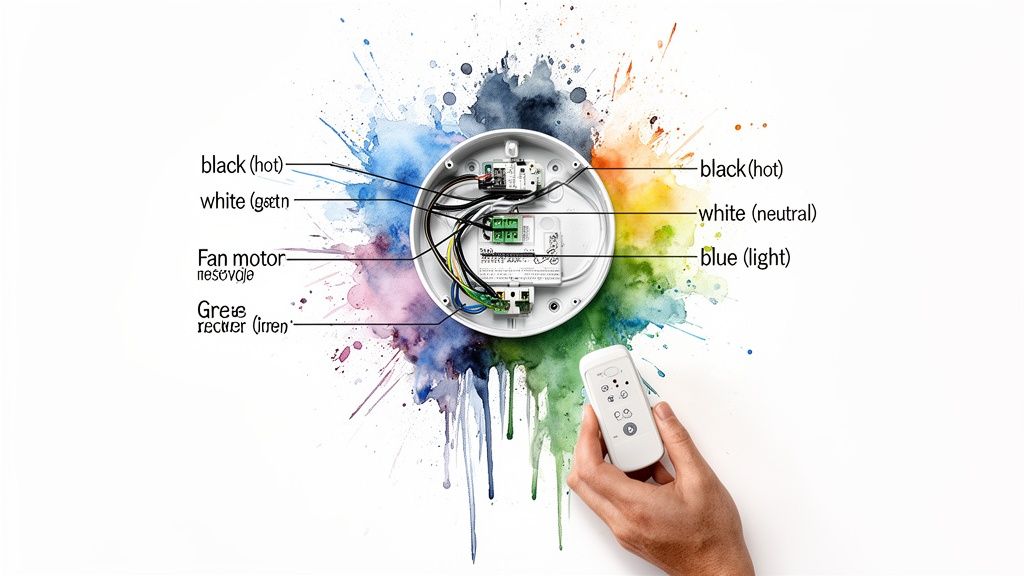
Before you even think about twisting a wire nut, let's have some fun and understand the "why" behind the connections. Imagine the remote receiver is a tiny, electrical traffic cop living in your ceiling. It takes that single stream of power from your house wiring and intelligently directs it where it needs to go—motor, lights, off—all based on the buttons you mash on the remote while lounging on the couch.
That little black box is what separates a basic, old-school fan you have to yank chains on from one with modern, push-button bliss. Without it, your fan is just a fixture. With it, you get a much more versatile and ridiculously easy-to-use appliance.
The Key Players in Your Ceiling Box
When you pop the cover off the electrical box in your ceiling, you’re going to find a few wires waiting for you. Don't be intimidated! Each one has a critical job.
- Black Wire (Hot): This is the live wire, the star of the show, bringing electrical current straight from your circuit breaker. It’s the power source.
- White Wire (Neutral): This one completes the circuit. It gives the electricity a safe path to return to the source. Think of it as the 'exit' sign for the current.
- Green or Bare Copper Wire (Ground): This is your safety net. If there's a fault, this wire gives the electricity a safe path to the ground, preventing dangerous shocks. It’s the unsung hero of electrical work.
These three wires are the foundation of your entire installation. The remote receiver will tap into this power source to run both itself and the fan.
Wires Coming from the Fan and Receiver
Next up, you've got the wires from your new fan and its remote receiver. The receiver is the ultimate middleman, with an "input" side that connects to your house wiring and an "output" side that connects to the fan itself.
Pro Tip: Do yourself a favor and lay out all the fan parts before you start. Identify and group the wires from the ceiling, the receiver, and the fan. It makes the whole process much less confusing when you’re standing on a ladder trying to juggle parts and remember what goes where.
Wiring diagrams have evolved right alongside smart home technology, especially for advanced models with remotes. It's no surprise that the smart ceiling fan market is projected to hit USD 521.6 million globally by 2025. This trend explains why over 70% of new residential installs in the U.S. now feature remote-compatible wiring. Standardized diagrams help cut down on faulty installations by an estimated 40%, keeping DIY projects safe and successful.
Quick Guide to Standard Wire Colors and Connections
To help you visualize how it all comes together, here's a quick cheat sheet for the most common wiring setup. This table breaks down where each wire comes from, what it does, and where it typically connects.
| Source | Wire Color | Its Function | Where It Connects |
|---|---|---|---|
| From the Ceiling | Black | Hot Power | Receiver's Black "AC in L" Wire |
| From the Ceiling | White | Neutral | Receiver's White "AC in N" Wire & Fan's White Neutral Wire |
| From the Ceiling | Green/Bare | Ground | Fan's Green/Bare Wire & Bracket's Green/Bare Wire |
| From the Receiver | Black | Power to Fan Motor | Fan's Black "Motor" Wire |
| From the Receiver | Blue | Power to Light Kit | Fan's Blue "Light" Wire |
Remember, this is a general guide. Your fan's specific diagram is the ultimate authority, so always double-check it.
Making the Right Connections
Matching these wires correctly is everything. Getting it wrong can mean a fan that doesn't work, a light that flickers, or even a serious safety hazard. That diagram packed in the box with your fan? It’s your new best friend. Follow it closely.
To see these principles in action, you can check out a complete DIY guide on how to install a ceiling fan with light that walks you through the physical steps.
The logic is always the same: house wires power the receiver, and the receiver powers the fan's motor and lights separately. If you want to nerd out on the technology behind it, you can explore the specifics of remote control ceiling fan systems and how they operate.
Gathering Your Tools and Safety Essentials
A successful ceiling fan installation—the kind that ends with a perfectly working fan, not a flickering light or an unexpected trip to the ER—starts long before you touch a single wire. It begins with preparation. Think of it as your pre-flight checklist for project awesomeness; skipping it just isn’t an option.
Working with electricity demands respect. That standard 120-volt circuit in your ceiling packs more than enough punch to be dangerous if you don't handle it right. Your absolute first move, before anything else, is to kill the power at its source.
The Unskippable Safety Protocol
And I don't just mean flipping the wall switch off. That’s an open invitation for someone to accidentally flip it back on while you’re working. You need to head straight for your home's circuit breaker panel and shut down the specific circuit that feeds the fan. Make it a dramatic, slow-motion flip for added effect.
Once you’ve flipped the breaker, here’s a pro tip: put a small piece of electrical tape over the wall switch. It’s a simple visual cue that acts as a clear "do not touch" sign for anyone else in the house. This little trick is all about reinforcing your safety zone.
A non-contact voltage tester is, without a doubt, the most important safety tool you can own for any DIY electrical project. It’s the only way to be 100% sure the wires you’re about to handle are completely dead. Just trusting the breaker is a rookie mistake.
Your Essential Tool Kit
With the power confirmed off, it's time to gather your gear. Having everything you need within arm's reach saves you from making a dozen trips up and down the ladder and keeps the project moving. You don’t need a massive professional toolbox, but a few items are absolutely essential.
- Non-Contact Voltage Tester: This is your #1 safety device. Just hold the tip near each wire in the ceiling box to confirm there’s no current. If it lights up or beeps, stop what you're doing and head back to the breaker panel.
- Screwdrivers: You’ll want both a Phillips head and a flathead. A multi-bit driver is even better, since the screws on fans and mounting brackets can vary.
- Wire Strippers/Cutters: These are critical for stripping insulation cleanly without nicking the copper strands inside. They also make nice, clean cuts.
- Pliers: A solid pair of linesman's pliers will make it much easier to twist wires together for a tight, secure connection before you cap them off.
- A Sturdy Ladder: Make sure it’s tall enough for your ceiling and always place it on a stable, level surface. Never overreach—it's safer to get down and move the ladder.
- Safety Glasses: A must-have for protecting your eyes from all the dust and debris that will inevitably fall out of an old ceiling fixture.
This foundational prep work is the key to any smooth installation. To see exactly how these safety steps fit into the bigger picture, you can find our detailed walkthrough on how to install a ceiling fan safely and easily. Following a clear plan from start to finish makes all the difference, ensuring your new fan is a source of comfort, not a headache.
Alright, let's get into the part where the rubber meets the road—or in this case, where the wires meet the wire nuts. When you pop open that electrical box in your ceiling, you’re looking at your home's unique electrical fingerprint. Most homes fall into a few common wiring patterns, and knowing which one you're dealing with is the key to getting this done right the first time.
This is where you'll be glad you took a moment to understand the wiring diagram for your new fan and remote. Let's walk through what you’re most likely to find up there.
The Classic Single-Switch Setup
This is, by far, the most common setup you’ll run into. You’ve got one wall switch that used to control the old light fixture. Now, that same switch will act as the master power source for your brand-new fan and light combo.
Once you open the ceiling box, you should see one black wire (hot), one white wire (neutral), and a bare copper or green wire (ground). Your remote receiver is designed for exactly this. You’ll connect the house’s black and white wires to the receiver’s “AC IN” side, and then hook up the fan’s motor and light wires to the “OUTPUT” side. Simple as that. The wall switch will now cut power to the whole unit, while your remote takes over the fun stuff like changing fan speed and dimming the light.
Tackling the Dual-Switch Dilemma
So, what happens if your old fixture had two switches on the wall—one for the fan and one for the light? This is also a pretty common scenario, and it's easy to adapt for a remote-controlled fan. Your goal here is to combine these two separate circuits into a single power source that feeds the remote receiver.
In the ceiling, this usually looks like two hot wires (often one black and one red), along with the neutral and ground. Since the remote will be handling the fan and light functions separately, you only need to use one of those hot wires to give the receiver power.
Expert Tip: Pick one switch to be the master power switch for the fan. The other one is now redundant. You'll need to safely cap off the second hot wire (the one connected to the unused switch) with a wire nut, both in the ceiling box and inside the wall switch box. This takes it completely out of the circuit so it can't cause any problems later.
The demand for remote-controlled fans has absolutely taken off, with the market projected to jump from USD 12.3 billion in 2024 to USD 17.6 billion by 2033. A huge driver is that modern fans use 30-50% less power. With residential installs making up over 60% of the market, clear instructions are essential—they help the 80% of DIYers who successfully install their fans avoid simple mistakes.
And before you touch a single wire, let's talk safety. This is non-negotiable.
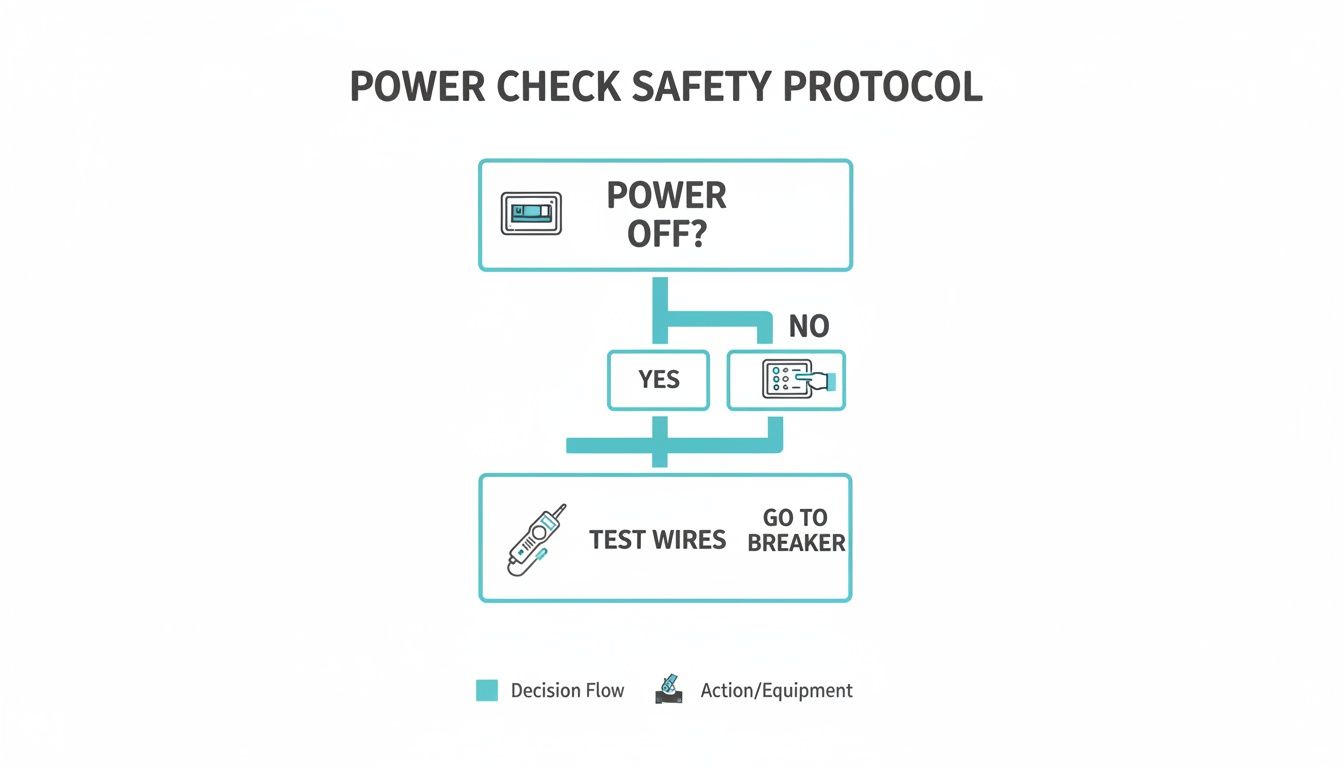
This chart drives home the most important rule of any electrical project: never trust that a circuit is off just because you flipped a switch. Always, always double-check with a voltage tester before your hands go anywhere near the wires.
Connection Guide for Single vs Dual Switch Setups
To make things crystal clear, here’s a quick-reference table showing how to connect your house wiring to the receiver in both of these common scenarios.
| Connection Point | Single-Switch Setup | Dual-Switch Setup | Connects to Receiver Wire |
|---|---|---|---|
| House Hot Wire(s) | Connect the single black wire. | Connect the chosen hot wire (black or red). Cap off the other. | Black "AC IN L" Wire |
| House Neutral Wire | Connect the white wire. | Connect the white wire. | White "AC IN N" Wire |
| House Ground Wire | Connect the ground wire. | Connect the ground wire. | Green Ground Wires |
Following this guide ensures the receiver gets the power it needs, regardless of whether you started with one switch or two.
Making the Receiver Fit
You’d be surprised how often this becomes the most frustrating part of the installation. You’ve got all the wires connected, but now you have to cram that bulky remote receiver into the fan’s mounting bracket or canopy. Space is always tight. Don't force it!
I’ve learned a few tricks over the years to make this part go smoothly:
- Tidy Up Your Wires: Don't just stuff them in. Neatly fold and bundle the wires, pushing them off to one side of the electrical box. This can free up just enough room.
- Find the "Shelf": Most mounting brackets have a little designated spot or groove where the receiver is designed to sit. Slide it in gently, making sure no wires get pinched.
- Position the Antenna: Your receiver has a thin antenna wire. Make sure it’s hanging freely and not coiled up or touching any metal parts of the bracket or fan, which can kill your remote's signal strength.
Properly managing the wiring at the switch is just as important. If you are converting from a dual-switch setup, our guide on how to wire a ceiling fan switch can be a huge help.
Investing in Premium Design and Performance
A ceiling fan can be so much more than just a functional appliance—it can be the centerpiece of a room's entire design. For anyone demanding both high style and powerful substance, certain premium models elevate a space from ordinary to exceptional. Let’s look at three standout fans, each priced over $300, that are a true investment in quality and aesthetics.
These aren't just fans; they're statement pieces that also happen to create a breeze. They justify their price with superior materials, silent DC motors, and designs that command attention.
The Artemis XL5: A Modern Marvel
For a truly dramatic statement in a modern great room or loft, look no further than the Artemis XL5 by Minka-Aire, a showstopper priced at $799.95. Its five gracefully curved blades span an impressive 62 inches, creating a sculptural form that feels both organic and futuristic.
But its beauty is more than skin deep. The Artemis XL5 is powered by a high-efficiency DC motor, which is not only incredibly quiet but also remarkably energy-efficient. This means you get powerful, room-filling airflow without the distracting hum of a lesser fan, making it perfect for spaces where you live, work, and relax. For more on the benefits of efficient motors, explore our guide on energy-efficient ceiling fans.
The Aviation: Industrial-Chic Powerhouse
Next up is the Aviation fan from Minka-Aire, available for $399.95. Inspired by the sleek, powerful lines of vintage aircraft propellers, this fan brings an industrial-chic vibe that feels both nostalgic and refreshingly modern.
Its three-blade design is engineered for maximum air movement, making it an ideal choice for large, open-concept living areas, workshops, or even covered patios. The clean lines and robust construction make it a versatile piece that complements anything from a rustic farmhouse to a minimalist urban loft. It’s a testament to how form and function can work together perfectly.
The rise of sophisticated models like these reflects a major shift in the market. A clear wiring diagram for a ceiling fan with remote is now essential, as it helps DIYers manage the 5-7 wires typical in these units—a feature that reduces the need for an electrician by an estimated 45%. This tech revolution is happening within a global ceiling fan market expected to hit USD 12.9 billion by 2025. You can discover more insights about this growing market on gminsights.com.
The Chateaux: Classic Elegance Meets Modern Tech
Finally, for those who appreciate timeless, ornate design, the Chateaux by Minka-Aire delivers classic elegance for $499.95. This fan features intricate scrollwork and detailed carvings that evoke the grandeur of a European estate. It’s the perfect finishing touch for a traditional dining room, a master bedroom with classic decor, or any space that calls for a touch of opulence.
Despite its traditional appearance, the Chateaux is thoroughly modern inside. It comes equipped with a convenient remote control, seamlessly blending old-world charm with the ease of 21st-century technology. You get the sophisticated look without sacrificing performance or convenience.
Choosing a premium fan is about more than just moving air. It's about investing in a fixture that enhances your home's character, comfort, and value for years to come.
Testing, Syncing, and Tackling Common Hiccups
The fan is up, the blades are on, and it's looking great. You're on the home stretch, but don't break out the snacks just yet—this final phase is where you confirm every connection is solid and your new fan is ready for its victory lap.
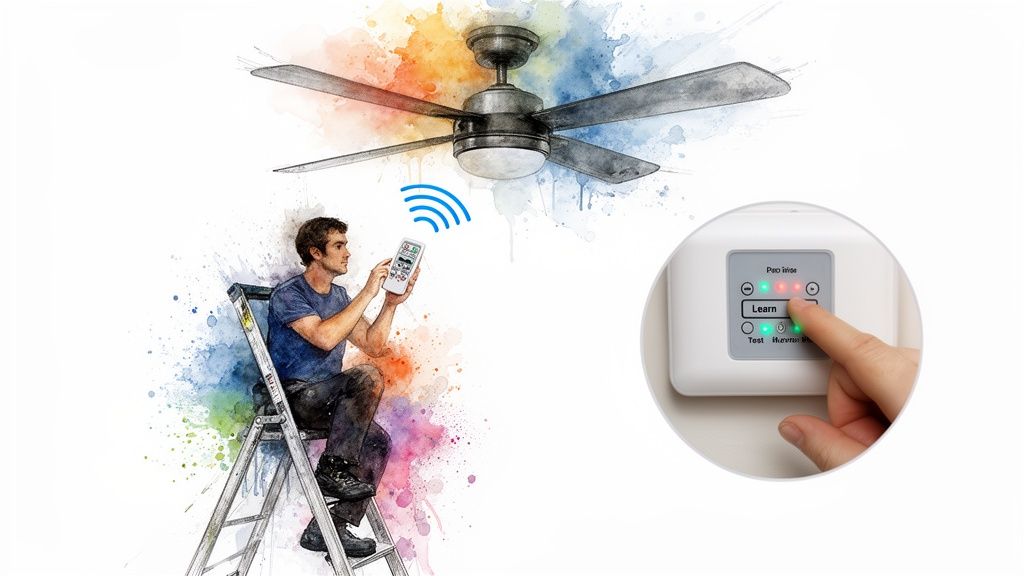
First thing's first: flip the wall switch to the "ON" position. From now on, that switch is just the master power supply for your fan. The remote is what you'll be using for day-to-day control.
With the wall switch on, head back to the breaker box and flip the circuit back on. You might hear a quiet beep from the fan's receiver—that's a good sign! It means the fan's brain is powered up and waiting for instructions.
The Remote Pairing Ritual
Now for the magic. Your new remote and the receiver need to get acquainted so they can talk to each other. This "syncing" process is what ensures your remote controls your fan, not the one your neighbor just installed.
Most modern fans make this incredibly easy with a "learn" button. Here's how it usually goes:
- Power It Up: Make sure the breaker and the wall switch are both on.
- Press and Hold: Within about 30 to 60 seconds of turning the power on, grab the remote and press and hold the pairing button. It might be labeled "Learn," "Pair," or have a little signal icon.
- Look for a Sign: The fan's light will often flash, or the receiver will beep, to let you know the pairing was successful.
If your fan uses the older DIP switch system, you'll need to slide the tiny switches inside the remote's battery compartment to match the pattern on the receiver itself. They have to be in the exact same on/off sequence to communicate.
A Quick Word on Troubleshooting: If the remote doesn't sync on the first try, don't panic. It's almost always a timing issue. Just kill the power at the breaker, wait a full minute for the receiver to reset, then flip it back on and try the pairing process again right away.
Running a Full Systems Check
Once your remote is synced, it's time for a proper test flight. Go through every single function on the remote to make sure your wiring work was spot-on.
- Fan Speeds: Cycle through low, medium, and high. Listen for any weird humming or clicking sounds.
- The Light: Turn the light on and off. If it's dimmable, test the whole range from bright to low.
- Reverse Function: Hit the reverse switch. You'll want to make sure you can change the blade direction for summer (counter-clockwise) and winter (clockwise).
- Stress Test: Let the fan run on its highest speed for a few minutes to make sure everything is stable and balanced.
Solving Post-Installation Puzzles
Even with a careful installation, little glitches can happen. Here's how to diagnose the most common issues without getting frustrated.
Problem 1: The Fan is Completely Dead
If nothing happens—no light, no motor—it's almost certainly a power issue.
- The Obvious Stuff: Double-check that the wall switch and the circuit breaker are both on.
- Check Your Connections: A loose wire nut is the most common culprit. Kill the power again and make sure the black "AC IN L" and white "AC IN N" wires from your ceiling are tightly connected to the receiver.
- Remote Issues: It sounds silly, but are the batteries in the remote fresh? Try the pairing process one more time.
Problem 2: The Light Works, but the Fan Blades Won't Spin
This is a classic symptom of one specific wiring mistake. The receiver clearly has power (since the light works), but the message isn't getting to the fan motor.
- Focus on the Output: Power everything down. Re-examine the wires going from the receiver to the fan. The black "Motor" wire from the receiver needs to be securely connected to the fan's motor wire. This is almost always where the problem is.
- DIP Switch Mismatch: On older models, a single mismatched DIP switch can sometimes cause partial function. Make sure every single switch is identical.
Problem 3: The Dreaded Fan Wobble
A little bit of movement is normal as the fan settles in, but if it's shaking excessively, that's a mechanical issue, not an electrical one.
- Blade Screws: Make sure every screw holding the blades to the brackets is tightened down. One loose screw can throw the whole thing off balance.
- Use the Balancing Kit: Your fan probably came with a little kit containing a plastic clip and some sticky weights. Follow the instructions to find the unbalanced blade and add a weight to even it out.
If you've tried everything and are still dealing with electrical problems, it could point to a deeper issue in your home's wiring. Getting professional guidance on Electrical Wiring Repair can help you safely diagnose what's going on. And if the fan works but the remote itself has given up the ghost, our guide on finding a replacement fan remote control can get you back in business.
Common Questions About Wiring a Ceiling Fan Remote
Even the best diagrams can leave you with questions when you're faced with your own home's unique wiring. Don't worry, you're not the first to hit a snag. Let's walk through some of the most common issues people run into when installing a remote.
Can I Add a Remote to My Existing Pull-Chain Fan?
Absolutely! This is probably one of the most common and satisfying DIY upgrades you can make. All you need is a universal remote control kit, which comes with the handheld remote and the little receiver box that does all the work.
The installation is almost exactly the same as putting in a brand-new fan with a remote. You'll kill the power, drop the canopy, and wire the receiver between the house wiring and the fan's wiring. The only real catch is making sure the receiver physically fits inside your fan's canopy. Some older models have pretty tight quarters up there, so it's worth checking the dimensions before you buy.
Why Is My Fan Humming After Installing the Remote?
That annoying hum is almost always an incompatibility issue between the fan's motor and the new remote receiver, especially with older fans. Some universal remotes regulate speed by "chopping" the power signal, and that can make the motor's internal parts vibrate and create a low hum.
My Two Cents: If you're retrofitting an old fan, your best bet is to find a remote kit from the same brand. If that's a no-go, invest in a high-quality universal kit that specifically mentions "quiet operation" or compatibility with standard AC motors. A cheap, bargain-bin remote is usually the culprit here.
My Remote Controls My Neighbor's Fan Too! What Do I Do?
Ah, the classic apartment building problem. This happens when your fan and your neighbor's are both set to the same factory frequency. Thankfully, it's a super simple fix.
- For Older Models with DIP Switches: Pop open the battery cover on your remote. You'll see a row of tiny switches. Just flip them into a new, unique pattern. Then, you'll have to get back up to the fan, find the matching switches on the receiver module in the canopy, and set them to the same new pattern.
- For Newer "Learning" Remotes: Modern fans make this even easier with a "learn" or "pairing" button. Just kill the power to your fan at the circuit breaker for about a minute. Flip it back on, and within 30-60 seconds, press and hold the designated pairing button on your remote. The fan's light will usually flash or the unit will beep to let you know it has successfully synced with your remote only.
Can I Still Use My Wall Switch to Control the Fan Speed?
No, and this is a really important one. Once that remote receiver is installed, the handheld remote is now the one and only controller for the fan's speed and light.
Your wall switch essentially becomes a master on/off switch for the entire fan unit. It needs to be left in the "ON" position at all times for the remote to work. If you have a dimmer switch on the wall, it's even more critical—trying to control the fan's speed with a wall dimmer can fry the receiver and even create a fire hazard. The remote is the new boss; the wall switch just provides the power.
At Fan Connection, we believe the right fan enhances your home's comfort and style. Explore our curated collections of premium fans, including the sculptural Artemis XL5 by Minka-Aire ($799.95), designed to provide silent, powerful airflow with a modern aesthetic. https://www.fanandlights.com


